Close Menu

    Subscribe to Updates

    Get the latest creative news from FooBar about art, design and business.

    What's Hot

    Teenage sensation G Kamalini earns call-up as India Women name star-studded squad for Asian Games 2026

    June 30, 2026

    El marketplace alemán de Kaufland llega a nuestro país

    June 30, 2026

    Gracie Abrams Drops ‘Look at My Life’ While Counting Down to ‘Daughter from Hell’

    June 30, 2026
    Facebook X (Twitter) Instagram
    Select Language
    Facebook X (Twitter) Instagram
    NEWS ON CLICK
    Subscribe
    Tuesday, June 30
    • Home
      • United States
      • Canada
      • Spain
      • Mexico
    • Top Countries
      • Canada
      • Mexico
      • Spain
      • United States
    • Politics
    • Business
    • Entertainment
    • Fashion
    • Health
    • Science
    • Sports
    • Travel
    NEWS ON CLICK
    Home»Business & Economy»US Business & Economy»6 Samsung phone features to turn on if you haven’t already
    US Business & Economy

    6 Samsung phone features to turn on if you haven’t already

    News DeskBy News DeskJune 30, 2026No Comments4 Mins Read
    Share Facebook Twitter Pinterest Copy Link LinkedIn Tumblr Email VKontakte Telegram
    6 Samsung phone features to turn on if you haven’t already
    Share
    Facebook Twitter Pinterest Email Copy Link

    Samsung builds fantastic phones, but the company also has a habit of shipping them with some of their absolute best features turned off by default.

    If you want to unlock the full potential of your Galaxy device, let’s take a few minutes to dive into your settings menu. There, you’ll find some incredibly cool features you should enable right away.

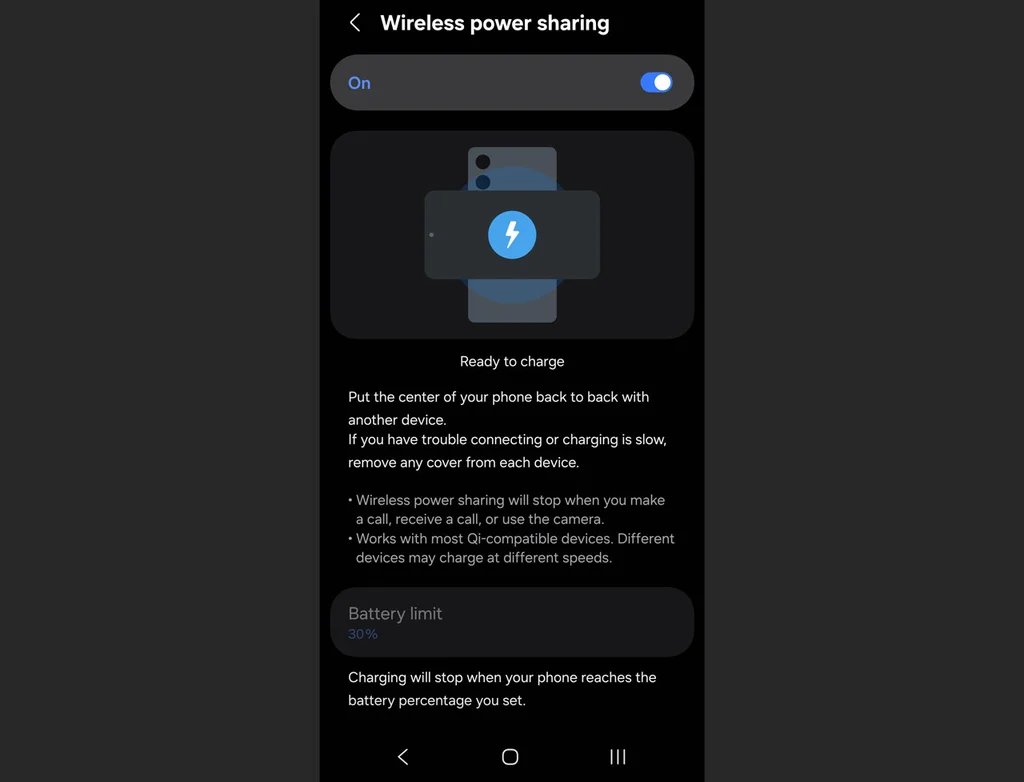
    Wireless power sharing

    Imagine your friend’s phone is dying, or your wireless earbuds completely fizzle out right before a flight. If you have a modern Galaxy phone, you’re carrying around a portable wireless charging pad in your pocket. You just have to activate it first.

    Go to Settings, scroll down to Battery, and tap Wireless Power Sharing. Toggle it to On, then flip your phone face-down and place the dying device right on its back.

    Notification history

    We’ve all done it: A notification pops up, you reflexively swipe it away to clear your screen, and a split second later you realize it was actually an important text, email, or delivery alert.
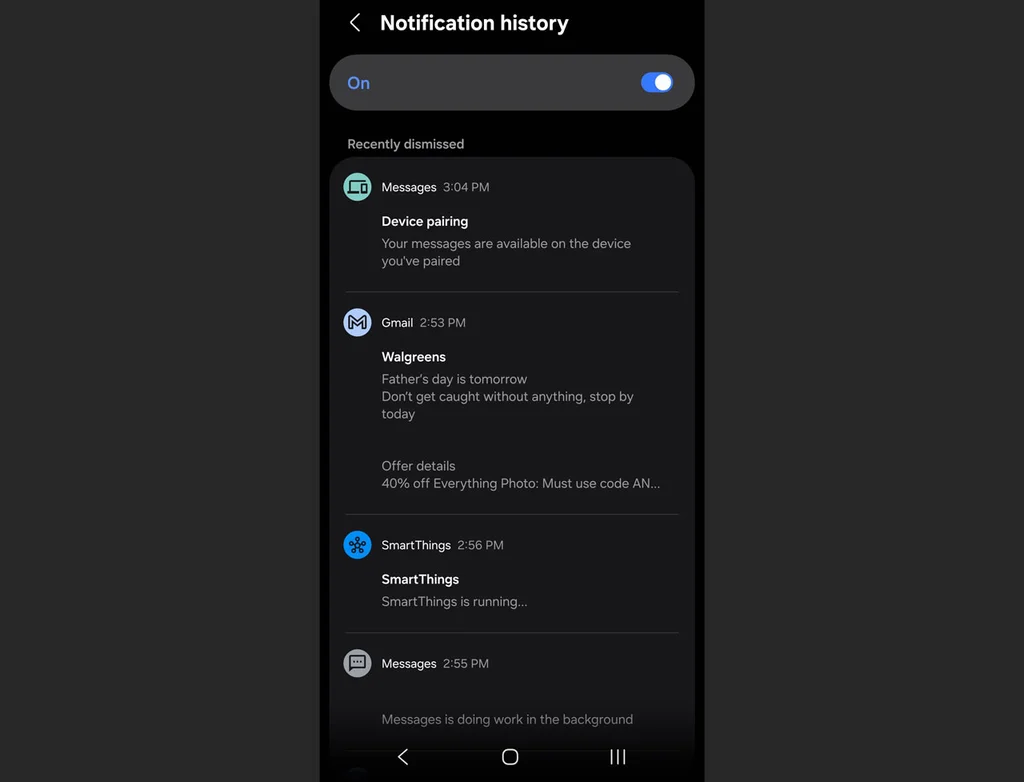
    Turning this feature on creates a digital paper trail for every single alert that hits your device. Open Settings, tap Notifications, select Advanced settings, and tap Notification history, then flip the toggle to On.

    Once enabled, this screen will keep a chronological log of every single notification you received over the past 24 hours, even the ones you accidentally dismissed. If you ever wonder what an alert said, you can just jump back in here to read it.

    Separate app sound

    If you’ve ever tried to play a podcast or music from your phone to a Bluetooth speaker only to have your audio violently interrupted by the loud chime of an incoming text message or a random game notification, this one’s for you.
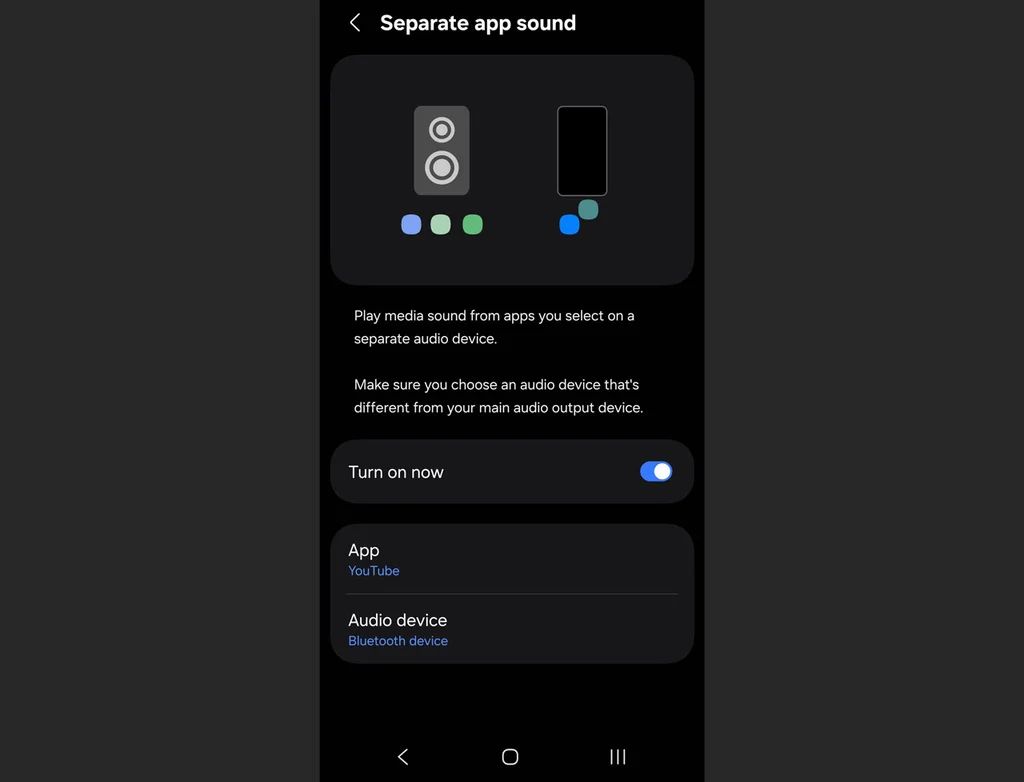
    The Separate App Sound feature isolates your audio streams so you can, for instance, set Spotify to play exclusively through your Bluetooth speaker or earbuds while your phone’s notification sounds stay local to the device’s actual speakers.

    Head over to Settings, select Sounds and vibration, scroll down to Separate app sound, and select which app you want to isolate and where you want it to play.

    Remap the power button

    Out of the box, pressing and holding the side button on a new Galaxy phone doesn’t actually bring up the power menu to turn your phone off. Instead, it launches a digital assistant.
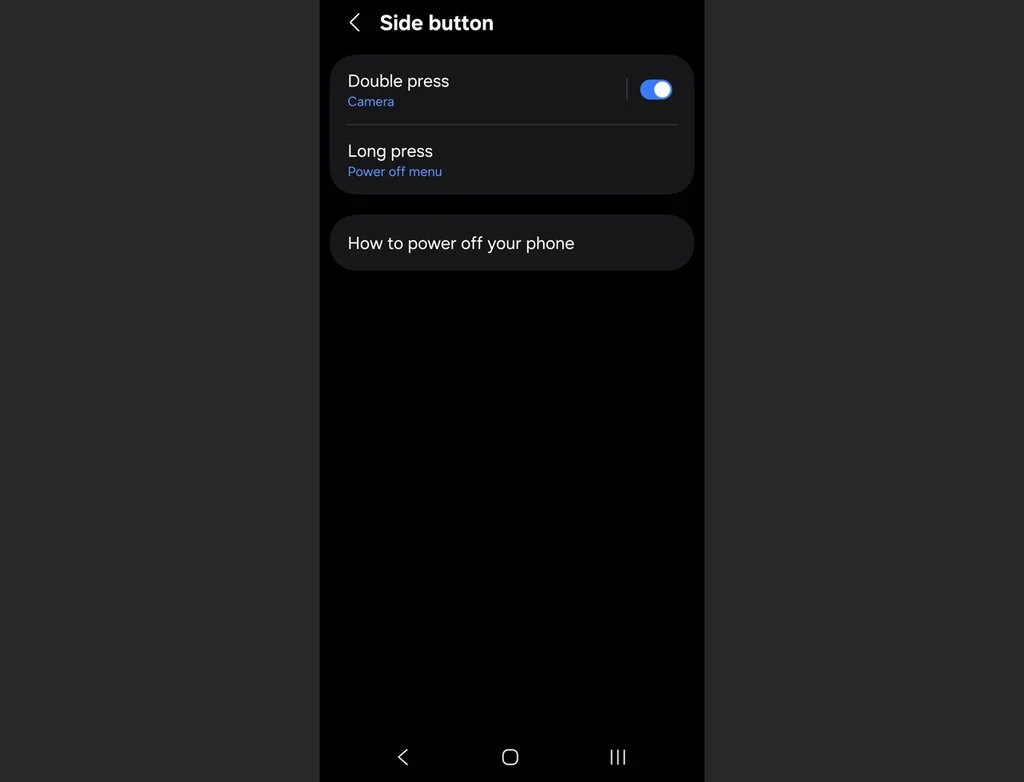
    Fortunately, you can reclaim your power button by going to Settings, tapping Advanced features, and selecting Side button. Under the “Press and hold” section, switch the setting to Power off menu.

    While you’re on this screen, you can also customize what a double-press of that same button does. By default, it opens the camera, but you can set it to instantly launch any app on your phone, such as your flashlight or mobile wallet.

    Mute with gestures

    When your phone starts blaring a loud alarm or an incoming call in the middle of a quiet room, your instinct is usually to frantically fumble with the volume rocker or slide the decline button. Samsung has a much more elegant, physical solution built right in.
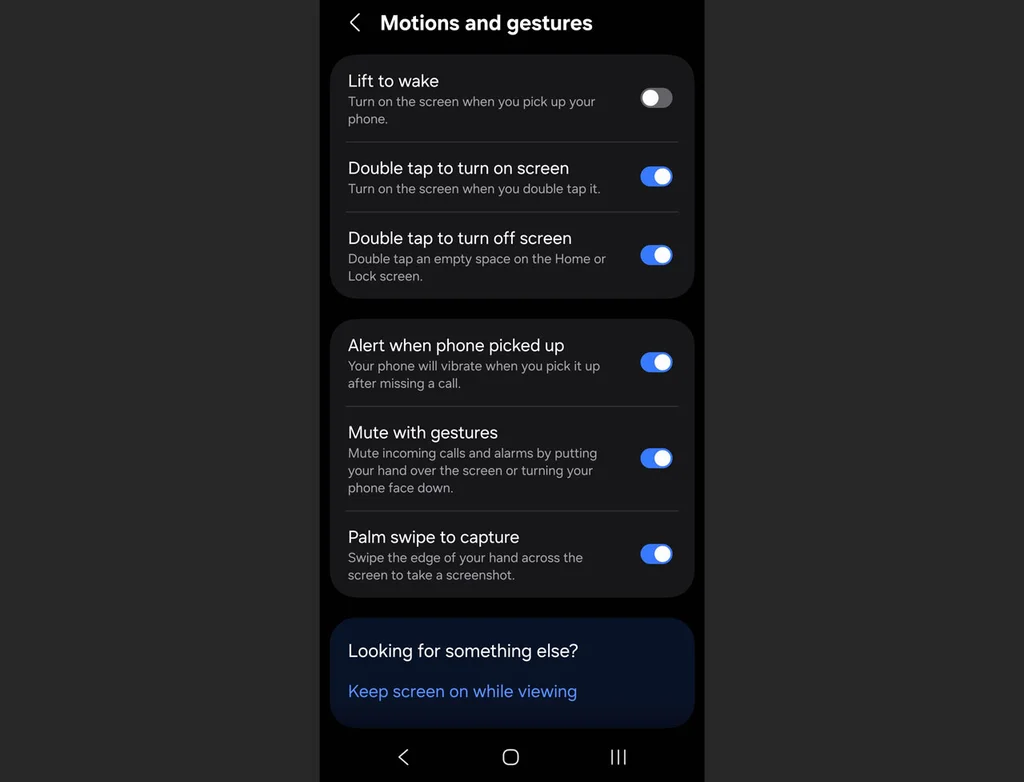
    Go to Settings > Advanced features > Motions and gestures, then activate Mute with gestures. The next time an alert goes off at the wrong moment, you can instantly silence it simply by placing your palm completely over the screen or flipping the phone face-down on a table.

    Battery protection

    Many people plug their phone into a fast charger overnight, meaning the phone hits 100% battery capacity in an hour or two and then sits there cooking under maximum electrical pressure for the rest of the night.
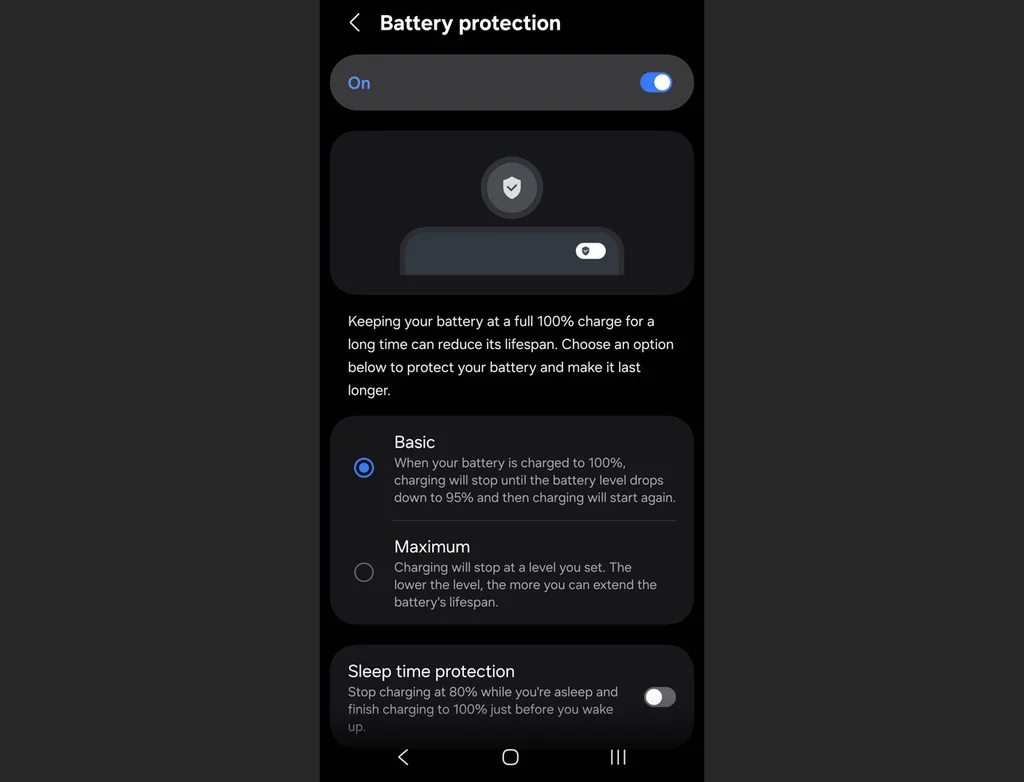
    This can degrade lithium-ion batteries rapidly, so if you plan to keep your phone for several years, you’ll want to limit that strain.

    Open Settings, go to Battery, and tap on Battery protection. Turning this on gives you a few options, including Basic or Adaptive modes, which limit the time your phone sits idling at absolute maximum charge while you sleep.


    Share. Facebook Twitter Pinterest LinkedIn Tumblr Email Telegram Copy Link
    News Desk
    • Website

    News Desk is the dedicated editorial force behind News On Click. Comprised of experienced journalists, writers, and editors, our team is united by a shared passion for delivering high-quality, credible news to a global audience.

    Related Posts

    US Business & Economy

    How SpaceX wants to fuel Starship’s next phase with a Texas pipeline

    June 30, 2026
    US Business & Economy

    The unbearable emptiness of the Great American State Fair

    June 29, 2026
    US Business & Economy

    JPMorgan names 2 co-presidents in its CEO succession contest

    June 29, 2026
    US Business & Economy

    AI couldn’t fix quality problems. So Ford rehired its most experienced engineers

    June 29, 2026
    US Business & Economy

    Trump’s new passport design is a too-perfect metaphor

    June 29, 2026
    US Business & Economy

    FIFA, who? The World Cup’s coolest jerseys come from indie designers

    June 29, 2026
    Add A Comment
    Leave A Reply Cancel Reply

    Don't Miss

    Teenage sensation G Kamalini earns call-up as India Women name star-studded squad for Asian Games 2026

    News DeskJune 30, 20260

    India have announced a formidable 15-member squad for the 2026 Asian Games in Aichi-Nagoya, Japan,…

    El marketplace alemán de Kaufland llega a nuestro país

    June 30, 2026

    Gracie Abrams Drops ‘Look at My Life’ While Counting Down to ‘Daughter from Hell’

    June 30, 2026

    Las acciones de AMC Entertainment (AMC) se hunden a medida que gana el mercado: lo que debe saber

    June 30, 2026
    Tech news by Newsonclick.com
    Top Posts

    un libro electrónico con sistema operativo Android y un botón muy particular

    May 31, 2026

    World Cup in Monterrey: A Soccer Enthusiast’s Guide

    May 31, 2026

    Spain backs two international studio projects with €39.8 million in public investment

    June 29, 2026

    SOUND FIST: MIZMO – HELLO (THE SUN IS UP WHERE ARE YOU)

    May 31, 2026
    Stay In Touch
    • Facebook
    • Twitter
    • Pinterest
    • Instagram
    • YouTube
    • Vimeo

    Subscribe to Updates

    Get the latest creative news from SmartMag about art & design.

    Editors Picks

    Teenage sensation G Kamalini earns call-up as India Women name star-studded squad for Asian Games 2026

    June 30, 2026

    El marketplace alemán de Kaufland llega a nuestro país

    June 30, 2026

    Gracie Abrams Drops ‘Look at My Life’ While Counting Down to ‘Daughter from Hell’

    June 30, 2026

    Las acciones de AMC Entertainment (AMC) se hunden a medida que gana el mercado: lo que debe saber

    June 30, 2026
    About Us

    NewsOnClick.com is your reliable source for timely and accurate news. We are committed to delivering unbiased reporting across politics, sports, entertainment, technology, and more. Our mission is to keep you informed with credible, fact-checked content you can trust.

    We're social. Connect with us:

    Facebook X (Twitter) Instagram Pinterest YouTube
    Latest Posts

    Teenage sensation G Kamalini earns call-up as India Women name star-studded squad for Asian Games 2026

    June 30, 2026

    El marketplace alemán de Kaufland llega a nuestro país

    June 30, 2026

    Gracie Abrams Drops ‘Look at My Life’ While Counting Down to ‘Daughter from Hell’

    June 30, 2026

    Subscribe to Updates

    Get the latest creative news from FooBar about art, design and business.

    Facebook X (Twitter) Instagram Pinterest
    • About Us
    • Editorial Policy
    • Privacy Policy
    • Terms and Conditions
    • Disclaimer
    • Advertise
    • Contact Us
    © 2026 Newsonclick.com || Designed & Powered by ❤️ Trustmomentum.com.

    Type above and press Enter to search. Press Esc to cancel.