Close Menu

    Subscribe to Updates

    Get the latest creative news from FooBar about art, design and business.

    What's Hot

    Bangladesh name squad for first Test against Australia as Soumya Sarkar earns long-awaited recall

    July 27, 2026

    3DownNation CFL power rankings: Winnipeg Blue Bombers’ identity crisis takes toll

    July 27, 2026

    Claves que marcarán la competitividad del sector industrial en el futuro

    July 27, 2026
    Facebook X (Twitter) Instagram
    Select Language
    Facebook X (Twitter) Instagram
    NEWS ON CLICK
    Subscribe
    Monday, July 27
    • Home
      • United States
      • Canada
      • Spain
      • Mexico
    • Top Countries
      • Canada
      • Mexico
      • Spain
      • United States
    • Politics
    • Business
    • Entertainment
    • Fashion
    • Health
    • Science
    • Sports
    • Travel
    NEWS ON CLICK
    Home»Business & Economy»US Business & Economy»How to put all your incoming messages in one unified dashboard (it’s easy!)
    US Business & Economy

    How to put all your incoming messages in one unified dashboard (it’s easy!)

    News DeskBy News DeskJuly 27, 2026No Comments3 Mins Read
    Share Facebook Twitter Pinterest Copy Link LinkedIn Tumblr Email VKontakte Telegram
    How to put all your incoming messages in one unified dashboard (it’s easy!)
    Share
    Facebook Twitter Pinterest Email Copy Link

    If your workday feels like a high-stakes game of notification whack-a-mole, you aren’t alone. Between Slack channels buzzing, Microsoft Teams pinging in the background, multiple email accounts open, and mobile messages cluttering your phone, simply checking if someone needs you takes up half your morning.

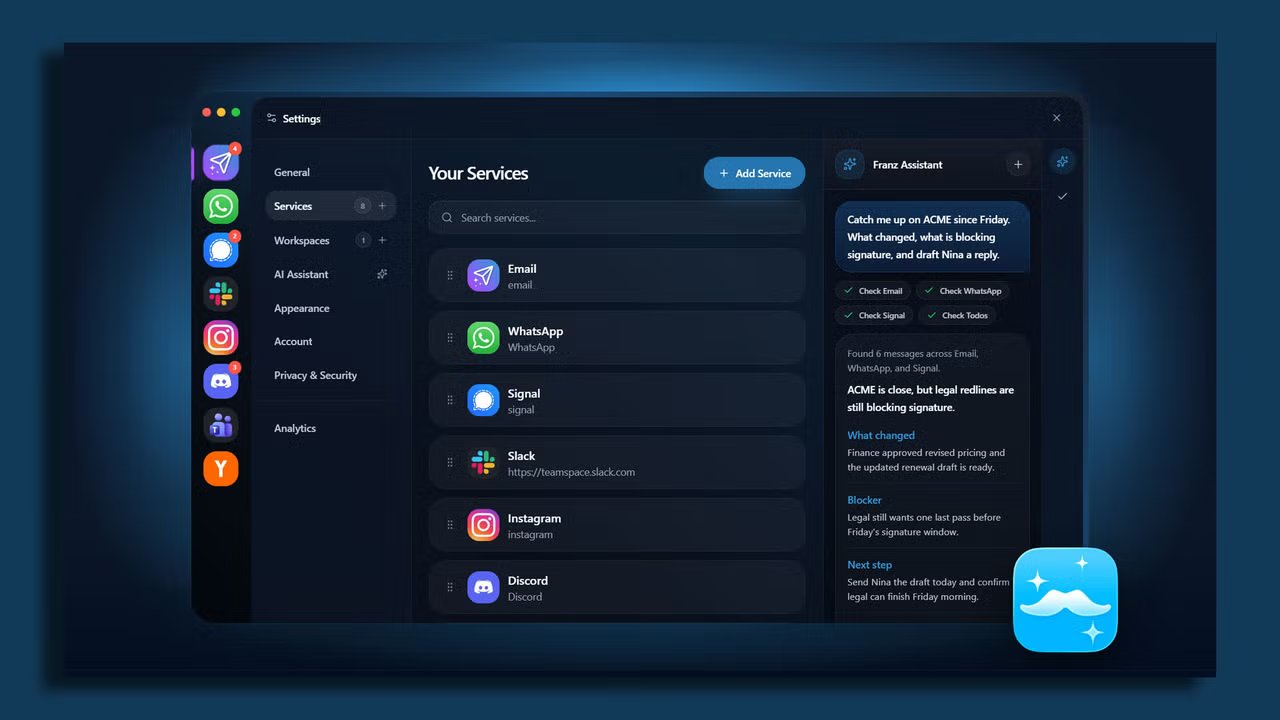
    You don’t need more communication tools! You need a single, unified dashboard that aggregates all those incoming messages into one central cockpit and then gives you complete control over when you actually see them.

    Here’s how to build one in about 20 minutes.

    The strategy: Use a catch-all app

    The cleanest, most reliable approach for most people is the aggregator app method. Rather than messing with complex webhooks or custom scripts, you wrap all your web-based messaging apps into a single desktop window with strict notification filters.

    Setting up your unified dashboard

    1.Prune your active channels

    Before pulling everything into one place, declare notification bankruptcy on channels you don’t actually need in real-time. Turn off “channel joined” alerts in Slack, mute low-priority Teams channels, and unsubscribe from non-essential email lists. If a channel doesn’t require direct action from you today, it shouldn’t be triggering real-time alerts.

    2.Choose and install a dedicated workspace app

    Download a specialized workspace aggregator like Rambox, Franz, or Shift. All three have free versions with enough features to get you started.

    These apps let you run communication apps inside a standalone, organized window. Instead of keeping eight browser tabs open that hog system memory, you get one clean interface with dedicated app profiles.

    3.Consolidate SMS and mobile messaging

    If SMS or mobile-first apps like Signal and WhatsApp are part of your work day, pair them to your desktop setup. Mac users can leverage native Messages syncing, while Windows users can hook up Google Messages for Web or Phone Link. Add these web endpoints right into your workspace app alongside your work chat apps.

    4.Kill badge counts and set unified focus hours

    I know it sounds blasphemous, but turn off all red unread badge counters inside your aggregator app. Badges are designed to trigger panic!

    Instead, configure custom notification schedules within your workspace app so alerts only land during designated check-in windows (for example, at 10am and 3pm).

    Optional: Create a “VIP-only” emergency fail-safe

    The biggest fear people have when consolidating messages is missing a genuine emergency. The fix isn’t keeping every app open on a secondary monitor, it’s creating a dedicated emergency bypass.

    Set up a specific keyword alert in Slack and Teams (like your name or “URGENT”) to trigger sound alerts, while muting all general channel activity.

    For email, create a simple rule that pushes desktop pop-up notifications only if the message comes from your direct manager or key clients.

    Share. Facebook Twitter Pinterest LinkedIn Tumblr Email Telegram Copy Link
    News Desk
    • Website

    News Desk is the dedicated editorial force behind News On Click. Comprised of experienced journalists, writers, and editors, our team is united by a shared passion for delivering high-quality, credible news to a global audience.

    Related Posts

    US Business & Economy

    This tiny fiber-optic plug could make laser weapons battlefield-ready

    July 27, 2026
    US Business & Economy

    Why Do Enterprise Brands Avoid Testing Bold Ideas in Public?

    July 26, 2026
    US Business & Economy

    Should you take that promotion?

    July 26, 2026
    US Business & Economy

    The invisible tax that might be holding back your startup

    July 26, 2026
    US Business & Economy

    The Toronto Tempo president explains how she’s building a WNBA franchise like a startup

    July 26, 2026
    US Business & Economy

    How to Turn Your Real-Life Experience Into Established Authority

    July 25, 2026
    Add A Comment
    Leave A Reply Cancel Reply

    Don't Miss

    Bangladesh name squad for first Test against Australia as Soumya Sarkar earns long-awaited recall

    News DeskJuly 27, 20260

    Bangladesh have announced a 15-member squad for the opening Test of their historic two-match series…

    3DownNation CFL power rankings: Winnipeg Blue Bombers’ identity crisis takes toll

    July 27, 2026

    Claves que marcarán la competitividad del sector industrial en el futuro

    July 27, 2026

    Fight to control worst wildfires in Spain’s history continue on Monday

    July 27, 2026
    Tech news by Newsonclick.com
    Top Posts

    Investigan un presunto crimen machista en Mairena del Aljarafe tras hallar el cadáver de una mujer

    June 27, 2026

    Jamie Lee Curtis Calls on ‘The Bear’ Viewers to Support Children’s Los Angeles

    June 27, 2026

    Amir Jangoo’s maiden Test fifty keeps West Indies in the hunt against Sri Lanka on Day 2 of the first Test

    June 27, 2026

    WALTER prevé cerrar su primer año de vida con más de 3 millones de facturación

    June 27, 2026
    Stay In Touch
    • Facebook
    • Twitter
    • Pinterest
    • Instagram
    • YouTube
    • Vimeo

    Subscribe to Updates

    Get the latest creative news from SmartMag about art & design.

    Editors Picks

    Bangladesh name squad for first Test against Australia as Soumya Sarkar earns long-awaited recall

    July 27, 2026

    3DownNation CFL power rankings: Winnipeg Blue Bombers’ identity crisis takes toll

    July 27, 2026

    Claves que marcarán la competitividad del sector industrial en el futuro

    July 27, 2026

    Fight to control worst wildfires in Spain’s history continue on Monday

    July 27, 2026
    About Us

    NewsOnClick.com is your reliable source for timely and accurate news. We are committed to delivering unbiased reporting across politics, sports, entertainment, technology, and more. Our mission is to keep you informed with credible, fact-checked content you can trust.

    We're social. Connect with us:

    Facebook X (Twitter) Instagram Pinterest YouTube
    Latest Posts

    Bangladesh name squad for first Test against Australia as Soumya Sarkar earns long-awaited recall

    July 27, 2026

    3DownNation CFL power rankings: Winnipeg Blue Bombers’ identity crisis takes toll

    July 27, 2026

    Claves que marcarán la competitividad del sector industrial en el futuro

    July 27, 2026

    Subscribe to Updates

    Get the latest creative news from FooBar about art, design and business.

    Facebook X (Twitter) Instagram Pinterest
    • About Us
    • Editorial Policy
    • Privacy Policy
    • Terms and Conditions
    • Disclaimer
    • Advertise
    • Contact Us
    © 2026 Newsonclick.com || Designed & Powered by ❤️ Trustmomentum.com.

    Type above and press Enter to search. Press Esc to cancel.