Close Menu

    Subscribe to Updates

    Get the latest creative news from FooBar about art, design and business.

    What's Hot

    Carlos Estévez To Undergo Shoulder Surgery

    September 2, 2026

    Alec Baldwin’s ‘Rust’ Trial Doc Is Heading To Theaters Next Month

    September 2, 2026

    Maia Bouchier’s stunning century propels England to splendid win over Ireland in 1st Women’s ODI

    September 2, 2026
    Facebook X (Twitter) Instagram
    Select Language
    Facebook X (Twitter) Instagram
    NEWS ON CLICK
    Subscribe
    Wednesday, September 2
    • Home
      • United States
      • Canada
      • Spain
      • Mexico
    • Top Countries
      • Canada
      • Mexico
      • Spain
      • United States
    • Politics
    • Business
    • Entertainment
    • Fashion
    • Health
    • Science
    • Sports
    • Travel
    NEWS ON CLICK
    Home»Science & Technology»US Science & Tech»How To Change The Background On iPhone Messages
    US Science & Tech

    How To Change The Background On iPhone Messages

    News DeskBy News DeskSeptember 1, 2026No Comments3 Mins Read
    Share Facebook Twitter Pinterest Copy Link LinkedIn Tumblr Email VKontakte Telegram
    How To Change The Background On iPhone Messages
    Share
    Facebook Twitter Pinterest Email Copy Link


    Filipe Espósito for Engadget

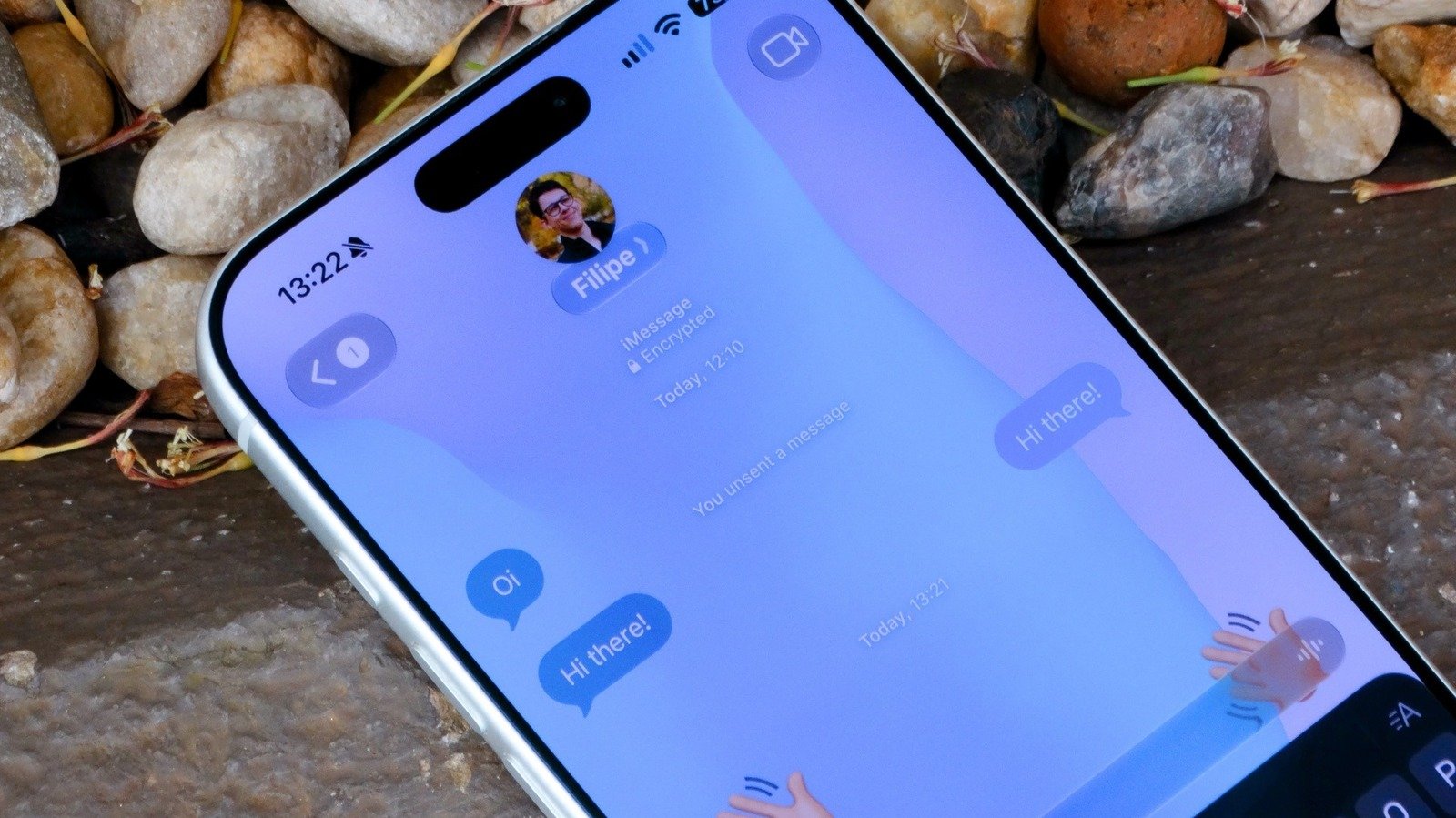
    Customizing the look of iOS is a good way to make your iPhone more fun and unique. You could already do this by changing your wallpaper, icon style and, as of iOS 26, even the intensity and translucency of the (somewhat unpopular) Liquid Glass effect. But there was one set of customization options where Apple was falling behind competitor apps, and that was Messages.

    While most messaging apps like Telegram and WhatsApp — and even chat functions within apps like Instagram — already offered different themes to choose from, Apple’s Messages app always had a boring white background (or black if you’re in Dark Mode). That changed with iOS 26 last year, so you can now zhuzh up the background of conversations in the Messages app to add a little more of your personality to your chats.

    Setting a custom background in Apple’s Messages app
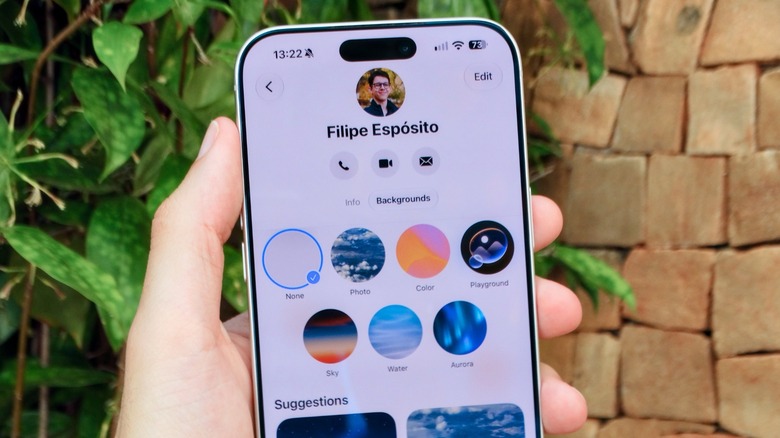

    Custom background options in Apple Messages.
    Filipe Espósito for Engadget

    Adding a background to your conversations in the Messages app only takes a few taps. On your iPhone, open the Messages app and tap any conversation where you want to change the background. Tap the contact or group icon, which you can see at the top of the conversation. Then, go to the Backgrounds tab.

    Here you’ll find a selection of wallpapers from Apple. There are Color, Sky, Water and Aurora to choose from. But the best part is that these wallpapers are all animated and customizable. 

    Prefer to use an image you shot yourself or found on the web? Just tap the Photo option among the available backgrounds and choose the photo you want. You’ll also see a list of suggested backgrounds featuring photos from your library that the system thinks you might like. Just keep in mind that everyone in the conversation will see that same background, not just you. 

    The Playground feature can also generate backgrounds using Apple Intelligence. This requires an iPhone 15 Pro or later, though. 

    When custom backgrounds are not available
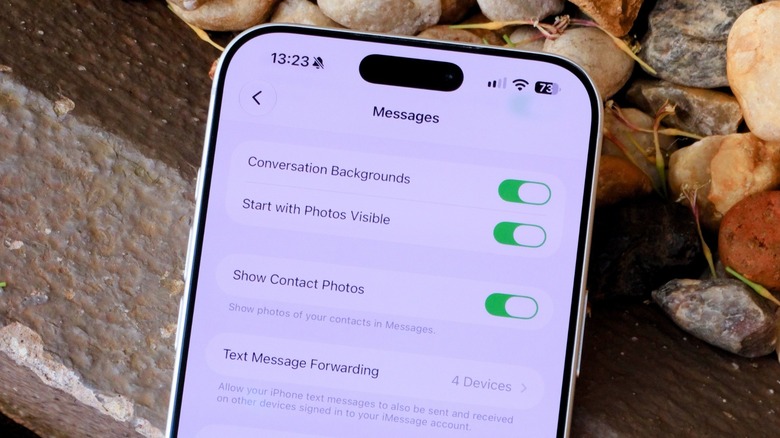

    Apple Messages settings.
    Filipe Espósito for Engadget

    Maybe you’ve tried these steps and still couldn’t set a custom background for your conversation in the Messages app on your iPhone. If that’s the case, there are a few things you need to check, such as whether the contact in that conversation uses iMessage. Unfortunately, custom backgrounds aren’t available for SMS or RCS, so your chats with friends on Android will still have that boring solid-color background.

    It’s also worth checking to see if your iPhone is running the latest software. In the Settings app on your iPhone, go to General and then Software Update to see if you have iOS 26 or later installed.

    Custom backgrounds in the Messages app can be turned off completely if you find them distracting. In your iPhone’s Settings, look for Messages in the Apps menu and check the Conversation Background toggle. If it’s turned off, you won’t see chat backgrounds, even if one of your contacts sets a custom background for their conversation with you.


    Share. Facebook Twitter Pinterest LinkedIn Tumblr Email Telegram Copy Link
    News Desk
    • Website

    News Desk is the dedicated editorial force behind News On Click. Comprised of experienced journalists, writers, and editors, our team is united by a shared passion for delivering high-quality, credible news to a global audience.

    Related Posts

    US Science & Tech

    This Is The Best Setting And Placement For Your Dolby Atmos Soundbar

    September 2, 2026
    US Science & Tech

    Larry Page’s flying car company Pivotal loses its CEO

    September 1, 2026
    US Science & Tech

    Are All TVs At Risk From Burn-In? Here’s How To Avoid The Problem Altogether

    September 1, 2026
    US Science & Tech

    Reliance’s JioHotstar takes its streaming empire global — without sports

    September 1, 2026
    US Science & Tech

    Blue Origin Wins NASA Contract For Telecommunications On Mars

    September 1, 2026
    US Science & Tech

    Apple follows Google in adopting Trump’s ‘Lake America’ name

    September 1, 2026
    Add A Comment
    Leave A Reply Cancel Reply

    Don't Miss

    Carlos Estévez To Undergo Shoulder Surgery

    News DeskSeptember 2, 20260

    Royals reliever Carlos Estévez will undergo shoulder surgery next week, manager Matt Quatraro tells reporters (link…

    Alec Baldwin’s ‘Rust’ Trial Doc Is Heading To Theaters Next Month

    September 2, 2026

    Maia Bouchier’s stunning century propels England to splendid win over Ireland in 1st Women’s ODI

    September 2, 2026

    Eric Stonestreet & Ferguson Talk ‘Modern Family’ Scrutiny

    September 2, 2026
    Tech news by Newsonclick.com
    Top Posts

    Sharmin Sultana returns as Bangladesh name squad for Women’s Asia Cup and Asian Games

    August 18, 2026

    Why So Many Fashion Brands Are Upcycling

    August 18, 2026

    Mark Goudie: OSEG fully committed to Ottawa Redblacks, no other changes imminent

    August 18, 2026

    🎙 PODCAST | Monjas: las falsas autónomas de Dios [R]

    August 18, 2026
    Stay In Touch
    • Facebook
    • Twitter
    • Pinterest
    • Instagram
    • YouTube
    • Vimeo

    Subscribe to Updates

    Get the latest creative news from SmartMag about art & design.

    Editors Picks

    Carlos Estévez To Undergo Shoulder Surgery

    September 2, 2026

    Alec Baldwin’s ‘Rust’ Trial Doc Is Heading To Theaters Next Month

    September 2, 2026

    Maia Bouchier’s stunning century propels England to splendid win over Ireland in 1st Women’s ODI

    September 2, 2026

    Eric Stonestreet & Ferguson Talk ‘Modern Family’ Scrutiny

    September 2, 2026
    About Us

    NewsOnClick.com is your reliable source for timely and accurate news. We are committed to delivering unbiased reporting across politics, sports, entertainment, technology, and more. Our mission is to keep you informed with credible, fact-checked content you can trust.

    We're social. Connect with us:

    Facebook X (Twitter) Instagram Pinterest YouTube
    Latest Posts

    Carlos Estévez To Undergo Shoulder Surgery

    September 2, 2026

    Alec Baldwin’s ‘Rust’ Trial Doc Is Heading To Theaters Next Month

    September 2, 2026

    Maia Bouchier’s stunning century propels England to splendid win over Ireland in 1st Women’s ODI

    September 2, 2026

    Subscribe to Updates

    Get the latest creative news from FooBar about art, design and business.

    Facebook X (Twitter) Instagram Pinterest
    • About Us
    • Editorial Policy
    • Privacy Policy
    • Terms and Conditions
    • Disclaimer
    • Advertise
    • Contact Us
    © 2026 Newsonclick.com || Designed & Powered by ❤️ Trustmomentum.com.

    Type above and press Enter to search. Press Esc to cancel.