Close Menu

    Subscribe to Updates

    Get the latest creative news from FooBar about art, design and business.

    What's Hot

    Gautam Gambhir makes bold statement after India beat West Indies to reach T20 World Cup 2026 semifinals

    March 2, 2026

    🎙 PODCAST | Señor ministro, diga que esta es su firma y hundamos a la izquierda en España

    March 2, 2026

    Henequen: the tainted history of Yucatán’s ‘green gold’

    March 2, 2026
    Facebook X (Twitter) Instagram
    Select Language
    Facebook X (Twitter) Instagram
    NEWS ON CLICK
    Subscribe
    Monday, March 2
    • Home
      • United States
      • Canada
      • Spain
      • Mexico
    • Top Countries
      • Canada
      • Mexico
      • Spain
      • United States
    • Politics
    • Business
    • Entertainment
    • Fashion
    • Health
    • Science
    • Sports
    • Travel
    NEWS ON CLICK
    Home»Business & Economy»US Business & Economy»Google Chrome just dropped 3 new time-saving features
    US Business & Economy

    Google Chrome just dropped 3 new time-saving features

    News DeskBy News DeskMarch 2, 2026No Comments3 Mins Read
    Share Facebook Twitter Pinterest Copy Link LinkedIn Tumblr Email VKontakte Telegram
    Google Chrome just dropped 3 new time-saving features
    Share
    Facebook Twitter Pinterest Email Copy Link

    Let’s be honest: The web browser is the modern-day operating system for everything from managing spreadsheets to pretending to work while reading tech blogs.

    Google knows this. That’s why the Chrome team announced a trio of new productivity features designed for people who basically live inside their browsers. Best of all? They’re actually quite useful.

    Here’s what you need to know to get your tab-hoarding, PDF-losing life back in order.

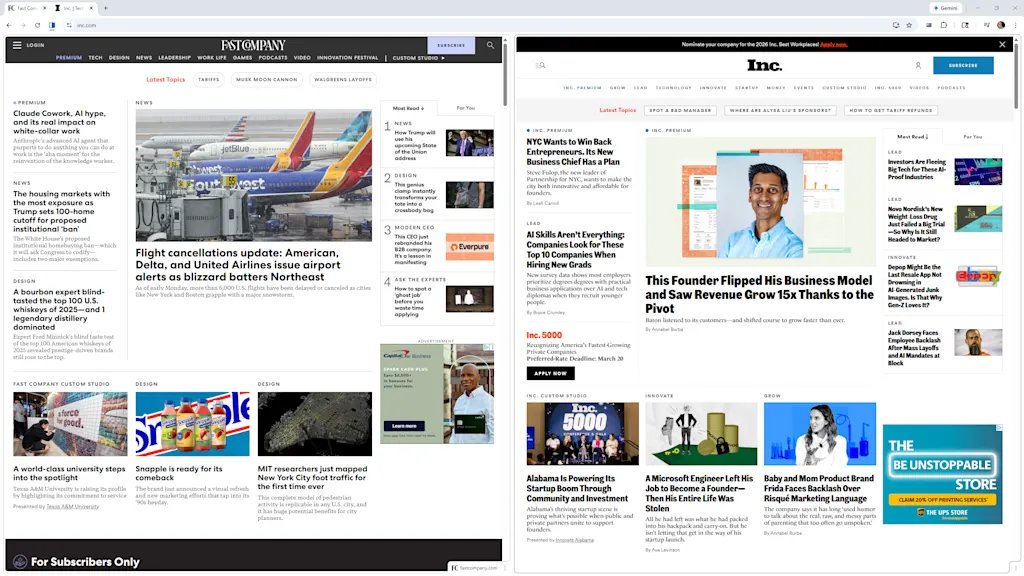
    Split View

    You know the drill. You’re trying to reference a document while writing an email, or maybe you’re watching a tutorial while trying to write code. You end up clicking back and forth between two tabs until your eyes cross.

    Enter Split View. It does exactly what it says on the tin: It lets you view two tabs side-by-side in a single window. No more dragging and resizing windows manually like it’s 2004.

    The feature is built into Chrome now, creating a single, organized workspace that keeps you focused.

    Unfortunately, it’s not super obvious. To enable it, you’ll need to open a new tab, then right-click said tab, and select “Add tab to new split view.”

    You’ll then have to select which of your open tabs to add to the other split-view pane. It takes about three or four more clicks than it should, but there you have it.

    PDF Annotations

    File this one under “Finally!”

    The Chrome PDF Viewer has always been a handy way to look at documents, but looking was about all you could do. If you needed to highlight a line or add a quick note, you had to download the file, open a dedicated PDF application, make the change, save it, and probably upload it again.

    Exhausting.
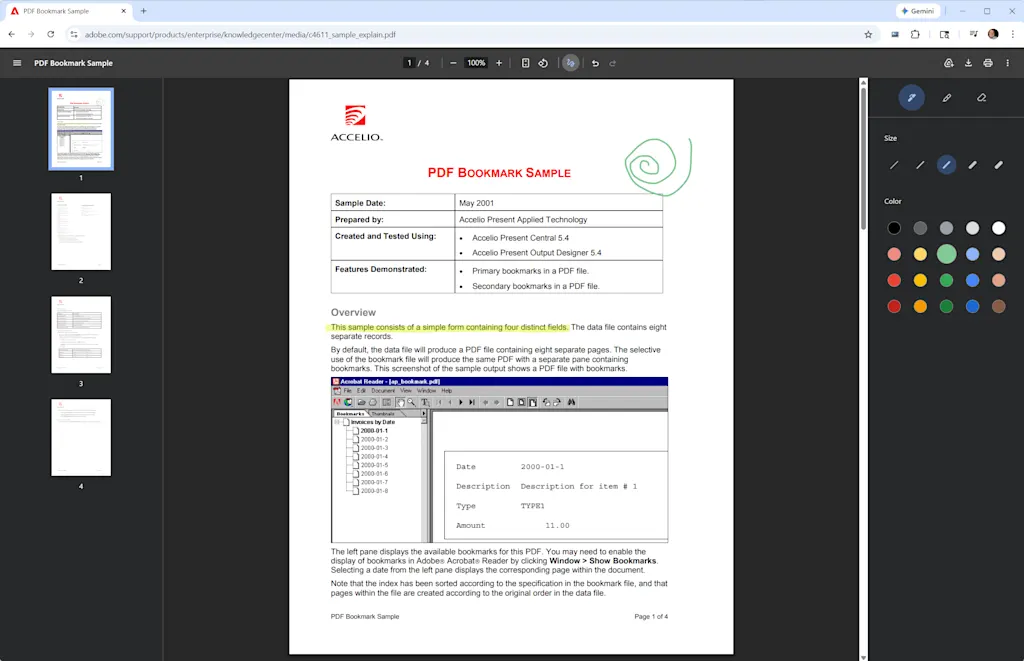
    Now you can highlight text and add handwritten notes to PDFs directly inside the browser by clicking the little squiggle icon at the top of any open PDF.

    This stuff isn’t as robust as Microsoft Edge’s PDF features, which let you enter typed text into form fields as well. But it’s still a tiny friction remover that’s going to save an unreasonable amount of annoyance.

    Save to Drive

    If your Downloads folder looks like a digital landfill of files named “Invoice_Final_V4(1).pdf,” you’re not alone. You download an important file, completely lose track of where your computer put it, and spend 10 minutes searching your hard drive.
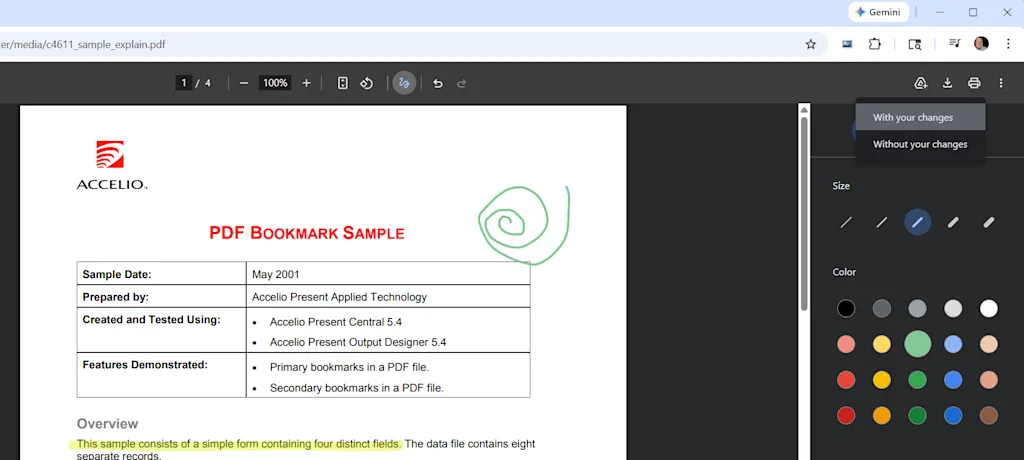
    To fix this, Chrome has added a direct “Save to Google Drive” feature. When you’re looking at a PDF, you can bypass the local download entirely by clicking the Google Drive icon in the upper-right corner.

    Chrome will whisk the file away to a dedicated “Saved from Chrome” folder right in your Google Drive. It’s instantly backed up, organized, easily searchable, and available on whatever device you decide to pick up next.


    Share. Facebook Twitter Pinterest LinkedIn Tumblr Email Telegram Copy Link
    News Desk
    • Website

    News Desk is the dedicated editorial force behind News On Click. Comprised of experienced journalists, writers, and editors, our team is united by a shared passion for delivering high-quality, credible news to a global audience.

    Related Posts

    US Business & Economy

    Navigating a late-career change

    March 2, 2026
    US Business & Economy

    Why Consultants’ Skills Are Practically Useless Thanks to AI

    March 1, 2026
    US Business & Economy

    Actor Awards 2026: Your guide to the rebranded SAG-AFTRA event, including where and when to stream it

    March 1, 2026
    US Business & Economy

    Could robot phones be the next leap in physical AI?

    March 1, 2026
    US Business & Economy

    Mattel has a new custom font, and it’s full of playful hidden details

    March 1, 2026
    US Business & Economy

    These 15 housing markets have the most borrowers underwater

    March 1, 2026
    Add A Comment
    Leave A Reply Cancel Reply

    Don't Miss

    Gautam Gambhir makes bold statement after India beat West Indies to reach T20 World Cup 2026 semifinals

    News DeskMarch 2, 20260

    India head coach Gautam Gambhir has sent shockwaves through the cricketing world with a stunning…

    🎙 PODCAST | Señor ministro, diga que esta es su firma y hundamos a la izquierda en España

    March 2, 2026

    Henequen: the tainted history of Yucatán’s ‘green gold’

    March 2, 2026

    T20 World Cup 2026 Semifinals: Date, Match Time, Venue, Broadcast and Live Streaming details

    March 2, 2026
    Tech news by Newsonclick.com
    Top Posts

    Gautam Gambhir makes bold statement after India beat West Indies to reach T20 World Cup 2026 semifinals

    March 2, 2026

    La supervivencia de la más fuerte

    January 31, 2026

    EconomĂ­a mexicana superĂł los pronĂłsticos; creciĂł 0.7%

    January 31, 2026

    Germán Berterame se arriesga y ficha con el Inter Miami

    January 31, 2026
    Stay In Touch
    • Facebook
    • Twitter
    • Pinterest
    • Instagram
    • YouTube
    • Vimeo

    Subscribe to Updates

    Get the latest creative news from SmartMag about art & design.

    Editors Picks

    Gautam Gambhir makes bold statement after India beat West Indies to reach T20 World Cup 2026 semifinals

    March 2, 2026

    🎙 PODCAST | Señor ministro, diga que esta es su firma y hundamos a la izquierda en España

    March 2, 2026

    Henequen: the tainted history of Yucatán’s ‘green gold’

    March 2, 2026

    T20 World Cup 2026 Semifinals: Date, Match Time, Venue, Broadcast and Live Streaming details

    March 2, 2026
    About Us

    NewsOnClick.com is your reliable source for timely and accurate news. We are committed to delivering unbiased reporting across politics, sports, entertainment, technology, and more. Our mission is to keep you informed with credible, fact-checked content you can trust.

    We're social. Connect with us:

    Facebook X (Twitter) Instagram Pinterest YouTube
    Latest Posts

    Gautam Gambhir makes bold statement after India beat West Indies to reach T20 World Cup 2026 semifinals

    March 2, 2026

    🎙 PODCAST | Señor ministro, diga que esta es su firma y hundamos a la izquierda en España

    March 2, 2026

    Henequen: the tainted history of Yucatán’s ‘green gold’

    March 2, 2026

    Subscribe to Updates

    Get the latest creative news from FooBar about art, design and business.

    Facebook X (Twitter) Instagram Pinterest
    • About Us
    • Editorial Policy
    • Privacy Policy
    • Terms and Conditions
    • Disclaimer
    • Advertise
    • Contact Us
    © 2026 Newsonclick.com || Designed & Powered by ❤️ Trustmomentum.com.

    Type above and press Enter to search. Press Esc to cancel.