
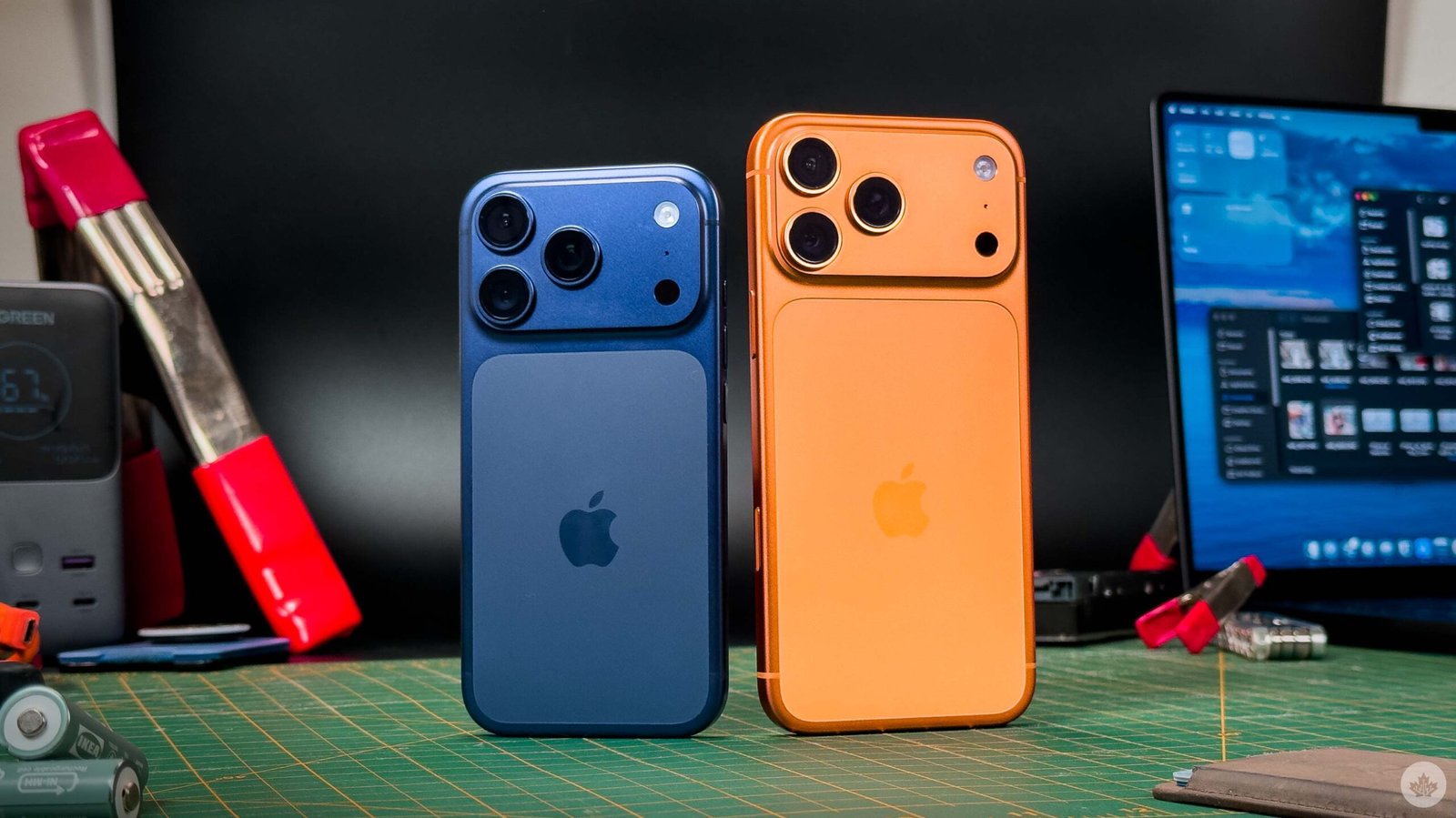
- With the announcement of the stylish iPhone Air, Apple has given itself an opportunity to target the Pro models directly at professionals who work with cameras, and it’s jumped in headfirst. Everything has been designed to make the phone work better as a camera, and in my testing, it’s paid off.
The new telephoto is stunning and while the crop-zoom method Apple is using might be a little unoradox, I actually like having all the options that solution presents me with when shooting. If I only have an 8x lens I know I’d miss the 4x a ton, so this feels like the best of both worlds.
The new chassis design uses aluminum again for its better thermal conductivity, and when combined with some straightforward engineering principles, the phone feels cooler to touch whenever it’s working hard this year. This is a considerable improvement for professionals since heat can damage the battery over time, and getting sweaty hands from holding a searing hot iPhone that’s been recording video all day is never fun.
Inside the new unibody, Apple has packed in its biggest iPhone battery ever and a new screen material that’s supposedly 3x less prone to scratches. This is a great update considering how scratched the 15 and 16 series got during the year I spent with each.
Camera first, phone second?
All of the photos in this review were shot with the iPhone 17 Pro. Except for the image with both phones at the top of the page. That was shot with an iPhone 16 Pro.
I’ve always found Apple’s camera improvements to be very inspired by the Japanese Kaizen concept, which says small, consistent changes over time will lead to a better product. It’s a slow process, but over time, all the parts finally click into place, revealing something extremely powerful. That’s exactly what the new telephoto lens did for the iPhone 17 Pro. It was the final piece of Apple’s modern camera assembly, moving all three lenses up to 48 megapixels this year to round out the best mobile camera system around.
Apple has finally moved the last rear lens up to a 48-megapixel sensor, and it’s a nice improvement over the 16 Pro’s 12-megapixel telephoto. The 16 Pro’s zoomed-in photos would start to fall apart when you crop in because the closer you get, the more you can see how much computational work is being done to make sure the photos are both sharp and not overly grainy. On the 17 Pro, the images come from a larger sensor; therefore, the processing is much less aggressive, and it allows you to crop in from an 8x (100mm) lens. The further reach provides for some cool lens compressions with decent foreground and background blur that looks like it came from a much larger camera. During my tests, there were some where the digital zoom on the 16 Pro, and very rarely the 15 Pro, could hold a candle to the 17 Pro’s 8x zoom. In bright light, taking pictures of buildings, you could get away with the older phones, but at night, the 17 Pro’s larger sensor takes in so much more light, it’s extremely usable this year.

From left to right, 17 Pro, 16 Pro and 15 Pro. All at 8X zoom.
That being said, you do want to be aware of how far you are from your subject. The iPhone won’t stop you from turning on 8x zoom anywhere, but if you point it at something less than a foot and a half away, it will just take an 8x zoom crop of the main sensor. This is pretty frustrating, and while it’s an impressive crop, it looks like crap next to the 8x you get from the telephoto lens. If you’re taking 8x shots that don’t look as good as you expect, try taking another step backwards, and that should solve things.
While the main and ultra-wide cameras haven’t received any hardware upgrades, Apple’s processing pipeline on the 17 phones generally does a better job of resolving fine details in challenging situations like low light or intense sun backlighting. Overall, I don’t think I’d upgrade to this new system if I had a 15 Pro, and definitely not if I had the 16 Pro. Beyond that, Canadians with older iPhones will see a massive jump in quality here across all three lenses.

The ultrawide across the 15/16/17 Pros are so similar in ideal conditions, the better photo can come down to which camera picked the best focus point. As the sun starts to set and the lighting gets more challenging, the three phones slowly start to separate themselves. The iPhone 15 Pro is the first to drop off since its ultrawide camera only has 12 megapixels. It’s pretty good, but once it gets dark, things start to get a bit mushy. The 16 Pro holds up much better, but you can tell the difference through how much noisier the 16 Pro will look once you start pixel peeping. The 17 Pro looks a little soft by comparison sometimes, but after each is edited, the 17 Pro usually holds up much better.
The primary lens has been the same for a few generations, so if you’re not a fan of zoom, you’re probably ok on the older 15. However, I will say that with the addition of Camera Control and the new Photographic Styles engine on the 16 and 17, the newer phones do make it a lot easier to point and shoot, and I missed Camera Control immensely when using the 15 Pro during this review. Photographic Styles I missed a little less since I spend a lot of time shooting RAW and editing myself with the Pro iPhones.
Overall, the software on the new camera is a little better, but the real upgrade is, of course, the new telephoto, which really opens up a much wider range of shots than I was anticipating, especially since it works so well in low light. If you’re just looking to take pictures for work or even of your kids’ soccer games from the stands, the new iPhone 17 Pro will help you get the best shots.

All of the new iPhone 17 models have gotten a nice front-facing camera upgrade this year that lets you shoot ultra-wide from the front camera, rotate your frame without rotating your phone, and more. It’s a really versatile upgrade, and for people who don’t like taking selfies, this opens up the front camera to be a more useful photography/videography tool.
Last year’s Camera upgrade revolved heavily around Camera Control, and it’s returned on the 17 series, but with some more options thanks to iOS 26. Now, during the setup flow, it asks you if you want to use the Camera Control menu that appears when you half-press the button. If you turn this one on, you can customize it in settings to only show the controls you want. I’ve found this helpful, and now I use it as a quick way to switch between all the iPhone lenses with one hand. I also use it as my main way to launch the camera, and often as a shutter button. A little after launch last year, an update allowed you to hold on Camera Control to lock focus, and I sometimes use that. Overall, I still really like the button, and I hope Apple keeps it around long enough to get more people accustomed to it.
Aluminum makes so much sense

The theme of this year’s iPhone 17 Pro design is practical engineering. The last few iPhones have generated a lot of heat under heavy workloads, and the new Pro is no different; however, this year, the design of the device is purpose-built to control the heat away from your hands and into the air. It’s not perfect, but it’s a nice step up over the 14/15/16 Pro phones, all of which I found could get really, really hot when you worked them hard enough. I even had a leather Dbrand skin on my 14 Pro, and it would sometimes get too hot while wireless charging.
The new design works by centring the A19 Pro chip under the camera plateau so that it’s away from the edges of the phone that you hold. Then, along the back of the phone, sort of where you’d imagine a spine would be, is a rectangular vapour chamber that helps move the heat along the back of the phone so it can disperse away more evenly through the Aluminum shell. Apple says this new unibody material is 20x more thermally conductive than the titanium Apple was using, which should help move heat out of the phone significantly better. I was hoping that the return to aluminum would also mean a lighter Pro iPhone as well, but this year, things actually got a few grams heavier with all the extra battery.

Since the new design is milled out of a block of aluminum, the seams on the back are less pronounced, and in the hand, the more rounded edges of the 17 Pro feel a lot nicer than any of the past iPhones, since dare I say the 11 series? On the back, there’s a smaller glass window for the wireless charger to go through, and I actually like how it looks, giving the phone a slightly more technical design while still retaining a lot of the trademark Apple minimalism. The silver version especially aligns with Apple’s other aluminum products, like the Mac Studio or the Silver AirPods Max.
The final big design choice is the camera plateau itself. I like it because it seems like a smart way for Apple to get more battery into the phone, and it looks a bit more technical than the 16 Pro series that needed to straddle the line between technical and luxurious. Now that the iPhone Air can take over the luxury crowd, the Pro series is free to be a little bolder, and I’m really excited to see where that leads. The slopes of the plateau are actually the Phone’s antennas, which Apple says help give the 17 Pro the best connectivity in any iPhone.
I’m testing the Midnight and Cosmic Orange models. While the orange is really fun, and I’m excited to see how it patinas over the year, silver seems like the obvious choice for anyone hoping to make their phone last a few years. Trends change, but a bright orange phone will be bright orange forever. That said, beyond the subjective elements like colour, I like that each design element of the phone can be traced back to a problem the team was trying to solve. The team worked very cleverly to meld form and function, which paid off handsomely.
As much power as the M2 chip

In Geekbench, the A19 Pro inside the iPhone 17 Pro (which is stronger than the one in the Air) benchmarks extremely high and is more in line with the M2 iPads than past iPhones. Across the board, GPU and CPU performance have increased. Plus, the 17 Pro has 12GB of RAM, double that of any previous iPhone, making it a beast at AAA games and crushing complex AI tasks.
For instance, the phone was able to play Hitman: World of Assassination and Assassin’s Creed: Mirage with ease and on slightly higher settings than I’ve felt comfortable using on an iPhone before. I was even able to play AC: Mirage on high settings with a 75 per cent render resolution, and it was not only playable, but it actually looked pretty good without the noticeable artifacting of the game’s upscaling tech.
The Air has the same amount of RAM and CPU cores, but it’s missing one GPU core, and since all that power is packed into a tiny camera bump, it gets thermal throttled a lot more than the 17 Pro with its unibody design.
Who is this phone for?

If you know or care about any of the following terms, congrats, you’re a huge nerd, and this phone is for you;
- Adaptive LTPO displays
- Gen Lock camera controls
- LOG video and RAW photos
- Multi Link Operation (MLO)
If you spend a lot of time gaming on the go and want the best performance and heat management on an iPhone, the new vapour chamber, unibody design and A19 Pro chip are impossible to beat. Plus, it has the best battery life of any iPhone and the fastest charging speeds. The A19 chip also helps with Apple Intelligence, and you can read my thoughts on Apple’s AI software a year later in my iPhone Air review.
If you’re a parent who spends a lot of time in the grandstands and needs an excellent zoom lens to take photos of your kids, this will also be perfect for you. Truthfully, anyone with a genuine interest in photography will be delighted with this phone, even if some of the newer features are geared towards professional videographers. If you need a small professional phono to shoot LOG video, this is the best option.
If you have a passing interest in mobile photography, the iPhone 17 series has some solid lens choices, but you need to use third-party apps to get at some of the more technical photo/video formats. That said, the smaller phone is so good now that anyone with some photography skills can easily use it to take great shots.
If you used to buy the iPhone in the Pro line simply because they’re the best and you can afford it, I’d recommend checking out the iPhone Air this year, since it translates a lot of the luxurious elements of past Pro phones into a thin and light package. It’s a lot more elegant than the bulky Pro and really feels like using the future of phones, today.
