
It might involve connecting a keyboard to your TV, which is as fun as it sounds.
If you’re paying the ever-increasing price of a Netflix subscription, its in your best interest to get your money’s worth from it. But while you can shell out for the 4K experience, you can’t guarantee you’ll get that pristine quality at all times. That’s not to say Netflix is withholding promised subscription perks, but it does make choices on your behalf. Like every other streamer, Netflix uses a variable bit rate codec for its streams. That means it prioritizes a consistent stream, and will throttle your picture quality if it thinks doing so will prevent the stream from buffering. If you’ve ever squinted at your TV and wondered whether that episode of Love is Blind is actually in full quality, you weren’t hallucinating.
Thankfully, as one of the best streaming services in 2026, Netflix has built-in tools that can provide you with more detailed information about your streaming quality. Those tools can be accessed regardless of your streaming service, whether you’re watching on a phone, tablet, computer, or TV. However, the method by which you’ll access them is a bit different on each platform. Additionally, you’ll need to be aware of the top resolutions and frame rates Netflix is capable of delivering to your hardware, as well as of the content you’re viewing. If there’s a gap, you’ll know you’re not getting the streaming quality you paid for. Depending on the reason for any downgrades you may notice in quality, you’ll be able to figure out whether the culprit is device limitations, network issues, or Netflix itself.
Netflix’s apps have hidden shortcuts for quality information
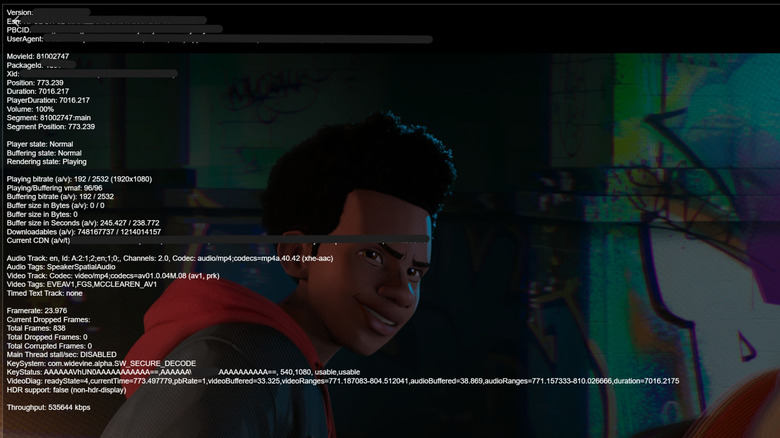
While watching a movie or show on Netflix from your Mac or Windows computer, you can view detailed information about your video stream by using the keyboard shortcut Ctrl + Alt + Shift + D. This will surface stats about your current streaming session, most of which you can safely ignore. In order to figure out how robust your picture quality is, look for the bitrate and frame rate. The former will tell you what resolution is being displayed, while the latter will let you know whether you’re losing frames. So, if you’re watching a newer movie on a 4K plan, you should typically see a resolution of 3840 × 2160 and a frame rate of roughly 23.9 or 24 frames per-second, depending on both the film and your hardware.
On a mobile device, go to app settings from the My Netflix tab and select Playback Specification. This will not give you live stream information, but will tell you what quality Netflix is capable of delivering to your device. On a smart TV, press the info button on your remote or connect a Bluetooth keyboard and press F4. This will surface a small amount of stream information.
Exactly which stats you should be looking for depends largely on your hardware and operating system. Even if you pay for the Netflix subscription tier which includes 4K, it can be maddeningly difficult to actually achieve that ultra-HD resolution. Many people who pay the extra money for Netflix’s 4K subscription may not actually own hardware that meets Netflix’s exacting standards for 4K delivery. So, now that you know how to see your streaming quality stats, let’s explore the hardware and software requirements you’ll need to get the best possible picture quality.
The nuances of video streaming quality on Netflix
Netflix’s 4K video streaming capabilities are subject to some rather maddening hardware and software requirements. If you are watching Netflix on a display with a 1440p native resolution, the stream will fall back to 1080p rather than showing a downscaled 4K stream. Because 1440p is a common resolution for gaming monitors, this can often be a frustrating dilemma for Windows users watching on a desktop PC. Moreover, your GPU, video cable, and display must not only support 4K as you’d expect, but must also support HDCP 2.2 for digital copyright management. Your operating system must support HEVC codecs, which can require an extra package installation on Windows and some versions of Android. Netflix is transitioning to AV1 from HEVC, but for now its official guidance is that HEVC support is a requirement for 4K playback.
Even once all those criteria are satisfied, you must be using the Microsoft Edge or Google Chrome browser on Windows. Other Chromium browsers and Firefox do not support 4K, and the native Windows Netflix app is simply its own instance of Edge. I write about tech for a living and have given up making 4K work on my Windows PC, but you can check out this extremely helpful Reddit post if you want to troubleshoot your own system.
On Mac, you must have a computer with an Apple M1 or newer processor, and you must use the Safari browser. Things get more complex if you connect your Mac to an external display, in which case, refer to the display requirements for Windows above. Meanwhile, iOS devices are capped at 1080p, since even the 2025 iPad Pro is not a 4K device. As for Android, it is capped at 1080p as well. The lone exception is when using a device which runs Google TV, such as the Google TV Streamer.
