Close Menu

    Subscribe to Updates

    Get the latest creative news from FooBar about art, design and business.

    What's Hot

    Mason Disick Spotted In Rare Photo By Mom Kourtney Kardashian

    August 23, 2026

    Salah scores first goals for Trabzonspor to give new club victory

    August 23, 2026

    ‘Today’ Hoda Kotb Shares Touching Moment That Left Ex In Tears

    August 23, 2026
    Facebook X (Twitter) Instagram
    Select Language
    Facebook X (Twitter) Instagram
    NEWS ON CLICK
    Subscribe
    Sunday, August 23
    • Home
      • United States
      • Canada
      • Spain
      • Mexico
    • Top Countries
      • Canada
      • Mexico
      • Spain
      • United States
    • Politics
    • Business
    • Entertainment
    • Fashion
    • Health
    • Science
    • Sports
    • Travel
    NEWS ON CLICK
    Home»Business & Economy»US Business & Economy»4 quick software tweaks to extend your phone’s battery life by 30 percent
    US Business & Economy

    4 quick software tweaks to extend your phone’s battery life by 30 percent

    News DeskBy News DeskAugust 16, 2026No Comments5 Mins Read
    Share Facebook Twitter Pinterest Copy Link LinkedIn Tumblr Email VKontakte Telegram
    4 quick software tweaks to extend your phone’s battery life by 30 percent
    Share
    Facebook Twitter Pinterest Email Copy Link

    Modern smartphones don’t run out of juice mid-afternoon because their batteries are defective. They run out because dozens of invisible background services are constantly running full-throttle in your pocket. Apps are pinging GPS satellites, pulling fresh data over weak cellular connections, and redrawing high-resolution screens 120 times per second.

    If your charger’s at home on the counter, alone and forgotten, you don’t need to put your phone in a drawer or live on Low Power Mode all day. Making a few surgical software adjustments can claw back about 30 percent of your battery life without turning your device into an offline paperweight. Here’s how.

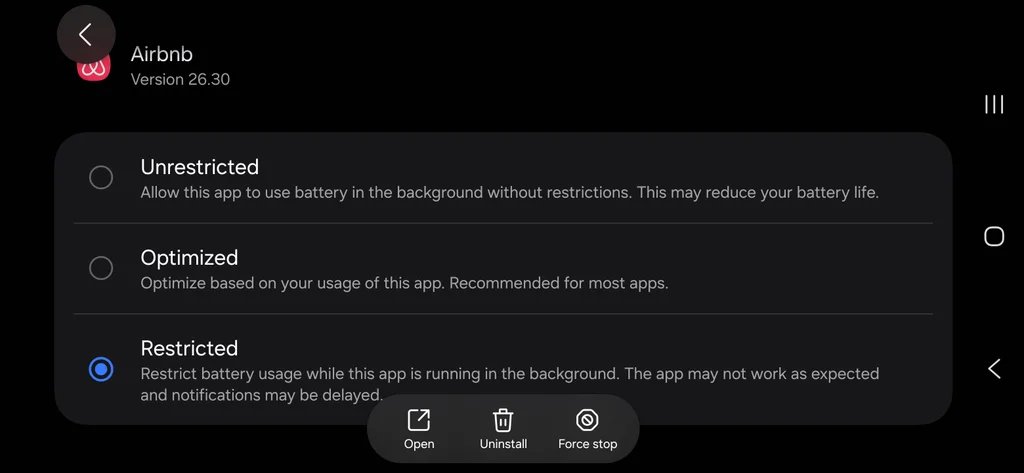
    Rein in Background App Refresh

    Background App Refresh sounds helpful, but most apps don’t need it. Social media feeds, retail apps, and casual games use this permission to download ads and content silently while your phone sits idle.

    • On iOS: Go to Settings > General > Background App Refresh. Switch it from “Wi-Fi & Cellular” to “Wi-Fi Only,” or turn it off entirely for every app except your essential email and messaging clients.
    • On Android: Go to Settings > Apps, select non-essential apps individually, tap Battery, and switch the background usage setting to Restricted.
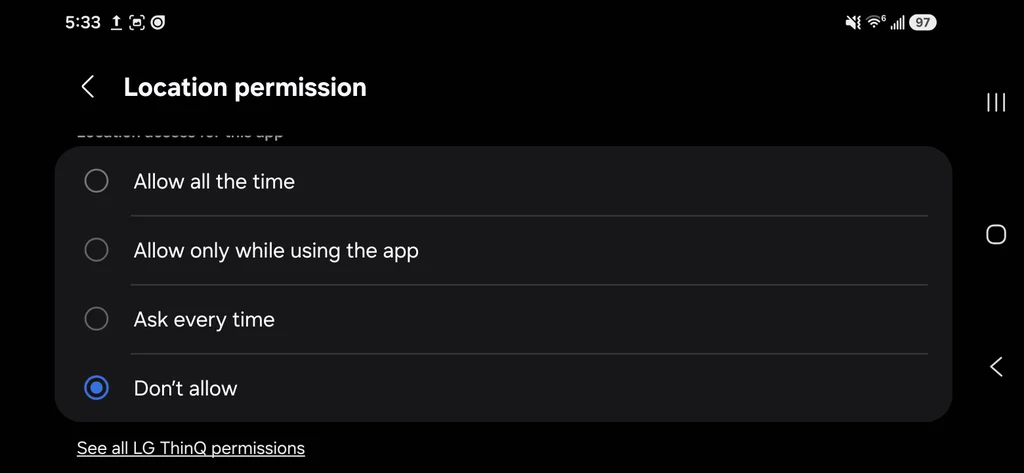
    Audit location tracking permissions

    GPS is one of the most power-hungry components in your phone. When an app checks your precise location every few minutes in the background, it fires up the location hardware and drains power rapidly.

    • Navigate to your location privacy settings (Privacy & Security > Location Services on iPhone; Settings > Location > App permissions on Android).
    • Change every app that doesn’t strictly need background GPS (like food delivery or shopping apps) from “Always” to “While Using the App” or even off completely—like I just did for the app that controls my washing machine! No idea why LG needs always-on location for that.
    • Toggle off Precise Location for apps like weather or news that only need to know what city you are in.
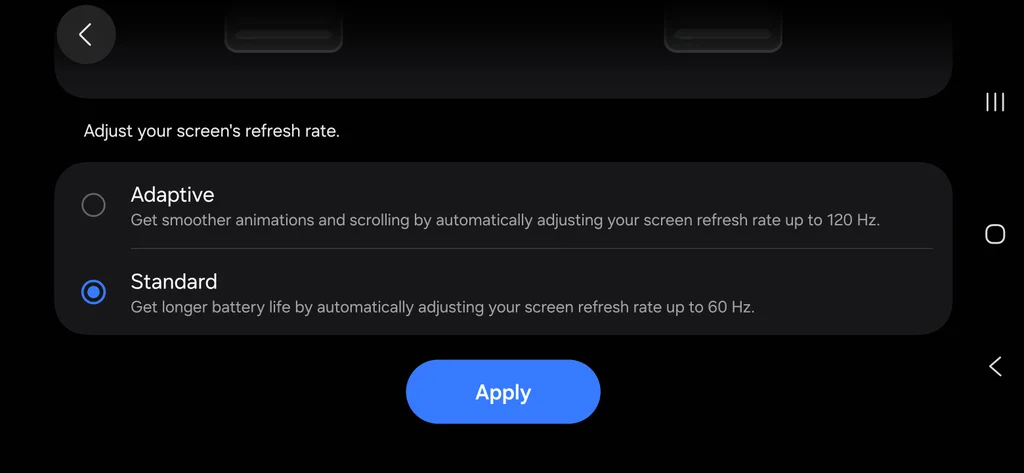
    Downshift your display

    Your screen is the single most power-hungry piece of hardware on your device. On long travel days, disabling high-end visual polish frees up significant battery capacity without compromising usability.

    • Enable true dark mode (OLED displays only): Because modern OLED screens illuminate individual pixels, rendering pure black consumes zero power on those parts of the panel.
      • iOS: Go to Settings > Display & Brightness, then tap Dark. (Optional: Toggle Automatic off so it stays dark all day).
      • Android: Go to Settings > Display, and toggle on Dark theme (or Dark mode on Samsung devices).
    • Disable always-on display: Keeping time, weather widgets, and lock screen wallpaper visible while your phone sits on your desk burns about one to two percent of battery every hour.
      • iOS: Go to Settings > Display & Brightness > Always On Display, and toggle Always On Display to Off.
      • Android: Go to Settings > Display > Lock screen, and toggle off Always show time and info (or Always On Display under Samsung Lock Screen settings).
    • Cap high refresh rate displays at 60Hz: If your device features a smooth 120Hz display (Apple ProMotion or Android Smooth Display), your phone redraws the screen twice as fast as a standard display. Dropping to 60Hz is barely noticeable when checking email or reading documents, but saves substantial juice.
      • iOS: Go to Settings > Accessibility > Motion, and toggle on Limit Frame Rate (this clamps the panel to 60Hz).
      • Android: Go to Settings > Display > Motion Smoothness (or Smooth Display), and switch the selection from High/Adaptive to Standard.
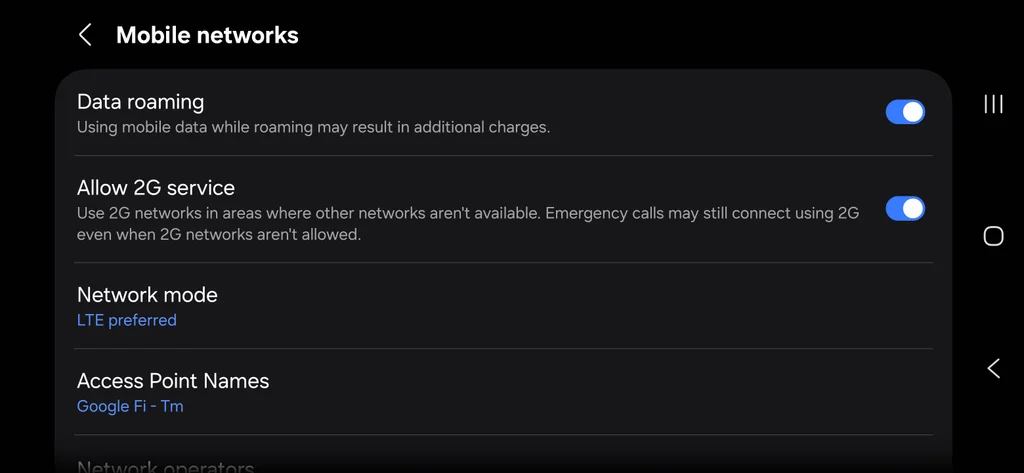
    Forego 5G

    5G radios require significantly more energy than 4G/LTE modems, especially when passing through airports or riding trains where 5G coverage fluctuates.

    Forcing your phone to stop searching for high-band 5G signals stops battery drain immediately.

    • Configure 5G settings on iPhone: Open Settings > Cellular > Cellular Data Options > Voice & Data. Choose 5G Auto to let iOS automatically drop down to LTE whenever 5G isn’t actively providing noticeably better speeds, or choose LTE if you’re in a weak signal area to prevent the 5G modem from firing up altogether.
    • Configure Network Mode on Android: Open Settings > Network & internet (or Connections on Samsung) > SIMs (or Mobile networks). Tap Preferred network type (or Network mode), and switch from 5G/LTE/3G/2G (Auto connect) to LTE/3G/2G (Auto connect) or LTE. This keeps the phone locked to stable LTE towers without hunting for high-frequency 5G bands.

    One of the most aggressive battery killers on a travel day isn’t an app, it’s a bad cell signal. When you enter a dead zone or a metal-shielded conference room, your phone turns up its transmitter power to try to reach a tower.

    If you notice your signal dropping down to a single bar while you’re working in a weak coverage area, flip on Airplane Mode manually and re-enable Wi-Fi if available. Preventing your phone from constantly searching for cellular signals saves a ton of juice.

    Share. Facebook Twitter Pinterest LinkedIn Tumblr Email Telegram Copy Link
    News Desk
    • Website

    News Desk is the dedicated editorial force behind News On Click. Comprised of experienced journalists, writers, and editors, our team is united by a shared passion for delivering high-quality, credible news to a global audience.

    Related Posts

    US Business & Economy

    How to use AI to give yourself a head start at a new job

    August 23, 2026
    US Business & Economy

    Your UNO skills could be worth $50,000 thanks to Mattel’s new tournament

    August 23, 2026
    US Business & Economy

    These 2 tools make it easy to create standout visuals

    August 23, 2026
    US Business & Economy

    Nuclear power is China’s key for transitioning to a fully renewable grid design

    August 23, 2026
    US Business & Economy

    The art of asking questions in a world full of answers

    August 23, 2026
    US Business & Economy

    USA Fencing’s scrappy plan to make fencing a hit before the 2028 Olympics

    August 23, 2026
    Add A Comment
    Leave A Reply Cancel Reply

    Don't Miss

    Mason Disick Spotted In Rare Photo By Mom Kourtney Kardashian

    News DeskAugust 23, 20260

    Mason Disick, 16, looked all grown up in a rare appearance in mom Kourtney Kardashian‘s…

    Salah scores first goals for Trabzonspor to give new club victory

    August 23, 2026

    ‘Today’ Hoda Kotb Shares Touching Moment That Left Ex In Tears

    August 23, 2026

    Who’s behind the new ‘stealth model’ Ox Alpha?

    August 23, 2026
    Tech news by Newsonclick.com
    Top Posts

    Ottawa Redblacks fire vice president of football ops Shawn Burke

    August 23, 2026

    SOUND FIST: ALEX WARREN – RESCUER

    August 9, 2026

    ‘The Bachelorette’ Star’s Wife Slammed Mocking Severe Disorder

    August 9, 2026

    Timothée Chalamet Absent From Kylie Jenner’s Birthday Bash

    August 9, 2026
    Stay In Touch
    • Facebook
    • Twitter
    • Pinterest
    • Instagram
    • YouTube
    • Vimeo

    Subscribe to Updates

    Get the latest creative news from SmartMag about art & design.

    Editors Picks

    Mason Disick Spotted In Rare Photo By Mom Kourtney Kardashian

    August 23, 2026

    Salah scores first goals for Trabzonspor to give new club victory

    August 23, 2026

    ‘Today’ Hoda Kotb Shares Touching Moment That Left Ex In Tears

    August 23, 2026

    Who’s behind the new ‘stealth model’ Ox Alpha?

    August 23, 2026
    About Us

    NewsOnClick.com is your reliable source for timely and accurate news. We are committed to delivering unbiased reporting across politics, sports, entertainment, technology, and more. Our mission is to keep you informed with credible, fact-checked content you can trust.

    We're social. Connect with us:

    Facebook X (Twitter) Instagram Pinterest YouTube
    Latest Posts

    Mason Disick Spotted In Rare Photo By Mom Kourtney Kardashian

    August 23, 2026

    Salah scores first goals for Trabzonspor to give new club victory

    August 23, 2026

    ‘Today’ Hoda Kotb Shares Touching Moment That Left Ex In Tears

    August 23, 2026

    Subscribe to Updates

    Get the latest creative news from FooBar about art, design and business.

    Facebook X (Twitter) Instagram Pinterest
    • About Us
    • Editorial Policy
    • Privacy Policy
    • Terms and Conditions
    • Disclaimer
    • Advertise
    • Contact Us
    © 2026 Newsonclick.com || Designed & Powered by ❤️ Trustmomentum.com.

    Type above and press Enter to search. Press Esc to cancel.