
Close Menu

    Subscribe to Updates

    Get the latest creative news from FooBar about art, design and business.

    What's Hot

    Dodgers Designate Cole Irvin For Assignment

    August 2, 2026

    Train derailment in Regina rail yard under investigation

    August 2, 2026

    ‘Counting On’ Jill Duggar Shares Big News About Derick Dillard

    August 1, 2026
    Facebook X (Twitter) Instagram
    Select Language
    Facebook X (Twitter) Instagram
    NEWS ON CLICK
    Subscribe
    Sunday, August 2
    • Home
      • United States
      • Canada
      • Spain
      • Mexico
    • Top Countries
      • Canada
      • Mexico
      • Spain
      • United States
    • Politics
    • Business
    • Entertainment
    • Fashion
    • Health
    • Science
    • Sports
    • Travel
    NEWS ON CLICK
    Home»Science & Technology»US Science & Tech»Here’s How To Switch From ChatGPT To Claude Without Losing Any Information
    US Science & Tech

    Here’s How To Switch From ChatGPT To Claude Without Losing Any Information

    News DeskBy News DeskJuly 29, 2026No Comments3 Mins Read
    Share Facebook Twitter Pinterest Copy Link LinkedIn Tumblr Email VKontakte Telegram
    Here's How To Switch From ChatGPT To Claude Without Losing Any Information
    Share
    Facebook Twitter Pinterest Email Copy Link

    A little copy/pasting is all it takes.


    OpenAI, Anthropic

    If you’re moving from ChatGPT to Claude, you don’t have to start with a clean slate. Earlier this year, Anthropic added Claude’s Import Memory feature, which lets you bring over saved context from other chatbots. Here’s how to get the best results.

    Goodbye, ChatGPT, hello Claude

    There are a few reasons you might want to switch from ChatGPT to Claude. Maybe you like Claude’s coding abilities, or perhaps you’ve soured on OpenAI because of its deal with the Department of Defense. If you are making the move, the good news is there isn’t much of a learning curve. The main challenge is moving your saved context from one chatbot to the other — and Anthropic’s import tool makes that part dead simple.

    Note that you don’t have to use memory at all. Claude and other AI chatbots are perfectly functional without remembering your preferences or past chats. (In that case, each new thread is a fresh start.) These steps are only for people who want to carry that context over.

    How to import memory from ChatGPT to Claude
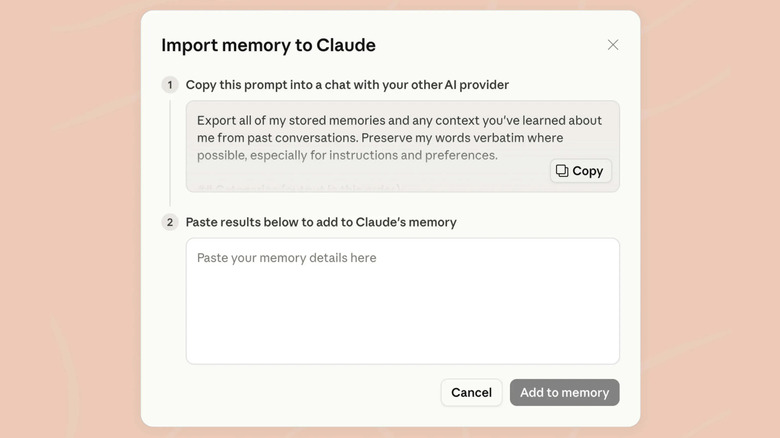

    Screnshot of Claude's chat memory import tool
    Screenshot by Will Shanklin (Anthropic)

    To get the best results, you’ll want to set things up on both sides. These steps work on the web and in the desktop apps for Claude and ChatGPT:

    1. In Claude, click your profile picture on the bottom-left. Then, head to Settings > Memory. If you don’t see that entry, look under Settings > Capabilities. (Anthropic is in the process of rolling out an updated interface.) Turn on Generate Memories from chats if it isn’t yet activated.
    2. Next to Import memory from other AI providers, click Start Import.
    3. Click Copy next to the prompt Claude provides.
    4. Open ChatGPT. Click your profile picture, open Personalization, and make sure Enable Memory is turned on. (If you’re only turning it on now, you’ll want to wait a few hours while it updates your memories.)
    5. Optionally, switch the ChatGPT model from Auto to Thinking using the keyboard shortcut Shift-Ctrl-M. Thinking mode allows ChatGPT to pull together a more thorough summary.
    6. Paste Claude’s prompt from step 2 into a new chat in ChatGPT and run it. It should generate a block of text summarizing your saved context. Copy the full output.
    7. Back in Claude, paste ChatGPT’s output into the import field and click Add to memory.

    Of course, this feature isn’t limited to ChatGPT. If you’re moving from Gemini, the same basic process applies. You just need to turn on its memory feature under Settings > Personal Intelligence > Memory before entering Claude’s import prompt and pasting the result back into Claude.

    Confirming the import
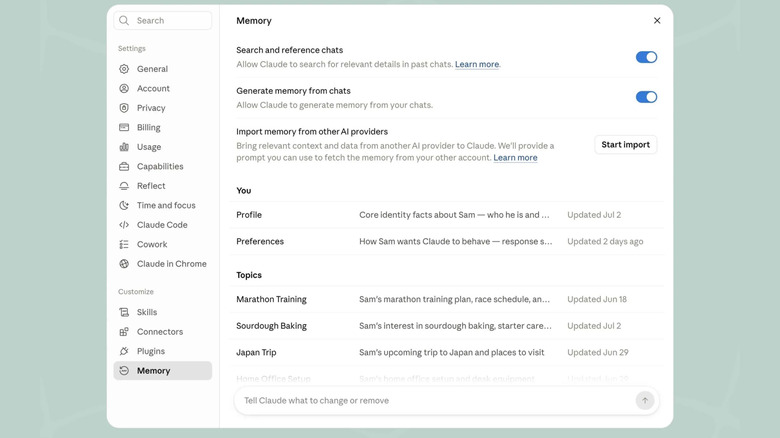

    Screenshot of Claude's memory settings screen
    Screenshot by Will Shanklin (Anthropic)

    Anthropic says it can take up to 24 hours for the import to finish. So, don’t panic if Claude’s answers don’t seem to incorporate your old context right away.

    After that, you can review what Claude remembers in Settings > Memory (or Settings > Capabilities > Memory from your chats if your account still uses legacy settings).

    Share. Facebook Twitter Pinterest LinkedIn Tumblr Email Telegram Copy Link
    News Desk
    • Website

    News Desk is the dedicated editorial force behind News On Click. Comprised of experienced journalists, writers, and editors, our team is united by a shared passion for delivering high-quality, credible news to a global audience.

    Related Posts

    US Science & Tech

    Inside the London hacker house taking a stand against founder burnout

    August 1, 2026
    US Science & Tech

    Judge denies xAI’s request to block Minnesota ban on ‘nudify’ apps

    August 1, 2026
    US Science & Tech

    YouTuber Hank Green says his AI usage is ‘not healthy’

    August 1, 2026
    US Science & Tech

    What Is USB Tethering And How Do You Enable It For Mobile Hotspot?

    August 1, 2026
    US Science & Tech

    Meta, TikTok, Snap And Google Face Wrongful Death Lawsuit From Four US Families

    August 1, 2026
    US Science & Tech

    How To Create And Delete Stickers On Your iPhone

    August 1, 2026
    Add A Comment
    Leave A Reply Cancel Reply

    Don't Miss

    Dodgers Designate Cole Irvin For Assignment

    News DeskAugust 2, 20260

    By Leo Morgenstern | at August 1, 2026 7:29pm CDT The Dodgers added right-handers Kyle…

    Train derailment in Regina rail yard under investigation

    August 2, 2026

    ‘Counting On’ Jill Duggar Shares Big News About Derick Dillard

    August 1, 2026

    Nikki Bella Has Been ‘Celibate Like A Nun’

    August 1, 2026
    Tech news by Newsonclick.com
    Top Posts

    Dodgers Designate Cole Irvin For Assignment

    August 2, 2026

    Rihanna Unveils Savage X Fenty Summer 2026 With a Four-Word Caption

    July 3, 2026

    Nazanin Mandi Sparks Reactions After Debuting Mystery Man

    July 3, 2026

    World Cup report, result and goals as Ronaldo helps Selecao survive late scare to set up Spain showdown

    July 3, 2026
    Stay In Touch
    • Facebook
    • Twitter
    • Pinterest
    • Instagram
    • YouTube
    • Vimeo

    Subscribe to Updates

    Get the latest creative news from SmartMag about art & design.

    Editors Picks

    Dodgers Designate Cole Irvin For Assignment

    August 2, 2026

    Train derailment in Regina rail yard under investigation

    August 2, 2026

    ‘Counting On’ Jill Duggar Shares Big News About Derick Dillard

    August 1, 2026

    Nikki Bella Has Been ‘Celibate Like A Nun’

    August 1, 2026
    About Us

    NewsOnClick.com is your reliable source for timely and accurate news. We are committed to delivering unbiased reporting across politics, sports, entertainment, technology, and more. Our mission is to keep you informed with credible, fact-checked content you can trust.

    We're social. Connect with us:

    Facebook X (Twitter) Instagram Pinterest YouTube
    Latest Posts

    Dodgers Designate Cole Irvin For Assignment

    August 2, 2026

    Train derailment in Regina rail yard under investigation

    August 2, 2026

    ‘Counting On’ Jill Duggar Shares Big News About Derick Dillard

    August 1, 2026

    Subscribe to Updates

    Get the latest creative news from FooBar about art, design and business.

    Facebook X (Twitter) Instagram Pinterest
    • About Us
    • Editorial Policy
    • Privacy Policy
    • Terms and Conditions
    • Disclaimer
    • Advertise
    • Contact Us
    © 2026 Newsonclick.com || Designed & Powered by ❤️ Trustmomentum.com.

    Type above and press Enter to search. Press Esc to cancel.