Close Menu

    Subscribe to Updates

    Get the latest creative news from FooBar about art, design and business.

    What's Hot

    Newcastle vs Liverpool: Line-ups confirmed at St James’ Park

    August 23, 2026

    Cityblock to Acquire Homeward Health, Secures $116M Series E

    August 23, 2026

    Hugh Jackman’s Ex-Wife Cast Doubts On His New Romance

    August 23, 2026
    Facebook X (Twitter) Instagram
    Select Language
    Facebook X (Twitter) Instagram
    NEWS ON CLICK
    Subscribe
    Sunday, August 23
    • Home
      • United States
      • Canada
      • Spain
      • Mexico
    • Top Countries
      • Canada
      • Mexico
      • Spain
      • United States
    • Politics
    • Business
    • Entertainment
    • Fashion
    • Health
    • Science
    • Sports
    • Travel
    NEWS ON CLICK
    Home»Science & Technology»US Science & Tech»What To Try When An Android App Keeps Crashing
    US Science & Tech

    What To Try When An Android App Keeps Crashing

    News DeskBy News DeskAugust 23, 2026No Comments5 Mins Read
    Share Facebook Twitter Pinterest Copy Link LinkedIn Tumblr Email VKontakte Telegram
    What To Try When An Android App Keeps Crashing
    Share
    Facebook Twitter Pinterest Email Copy Link

    Get back to doomscrolling or swiping right as quickly as possible.


    Adnan Ahmed for Engadget

    The Google Play Store is home to millions of apps, and it’s also where developers push updates that introduce new features and squash bugs. I’ve been an Android user all my life, and in my experience, app crashes have mostly been caused by buggy updates rather than something being wrong with the phone itself. So, if an app has been acting strangely, heading to the Play Store is one of the first troubleshooting steps worth trying. 

    To do so, tap on your profile picture in the top-right corner, select Manage apps and device, and under the Updates available section, check to see if there’s a newer version of the troublesome app waiting to be installed.

    If there are no pending updates for you to install, you can dig a bit deeper into the app’s settings. There are two ways to go about this. You can either long-press the app’s icon on your home screen or app drawer and tap the tiny “i” icon to access the App info page, or head to Settings > Apps and select it from the list of installed apps. Depending on your phone’s version of Android, these options may be labeled a bit differently.

    While you’re in the App info settings, tap on Storage & cache and select the Clear cache option. Head back, tap on Force stop and try launching the app again. Clearing the cache removes temporary files the app has stored that could have become corrupted. Android has had this neat cache management system on a per-app basis for years, which can also help speed up apps that have become sluggish over time. 

    Clear the app’s data
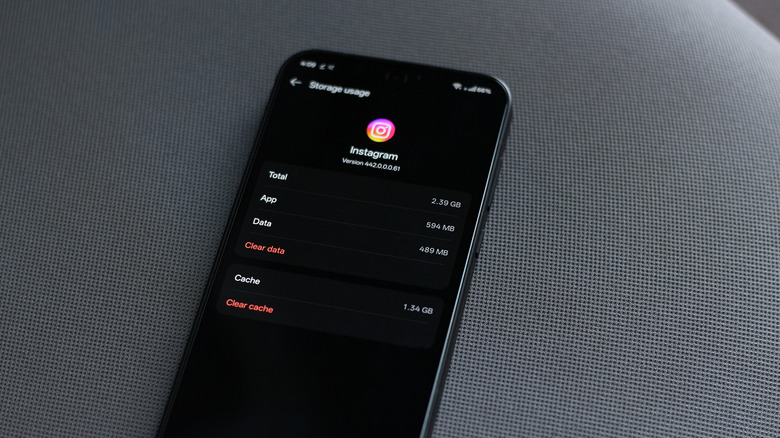

    Clearing an app's cache on Android.
    Adnan Ahmed for Engadget

    If clearing the app’s cache and force stopping it didn’t do the trick, you can attempt to fully uninstall it and download it from the Play Store again. The downside to this approach is that you’ll wipe any data the app has stored locally. This includes credentials, media files and other preferences. If the app has the ability to sync data to the cloud, all you’ll have to do is sign back in. However, if you haven’t enabled cloud backup for the app, you should consider setting that up before uninstalling it so you can preserve your data.

    Alternatively, you can also head to the App info page for the app and tap on Clear data. This saves you the hassle of having to download the app again. That said, if you’re connected to a decently fast network, reinstalling the app from the Play Store is the more thorough option if you’re trying to fix persistent crashes.

    Though you don’t need to do it regularly, restarting your phone can sometimes be a surprisingly quick fix for a lot of issues. You can force restart most Android phones by holding down the power button until the screen goes black and the logo appears. Some models may require you to hold down either the volume up or volume down buttons in addition to the power button.

    It’s also worth checking if your phone itself has any updates available. Apart from getting to enjoy new features, staying on up-to-date software ensures you have the latest bug fixes and security patches, some of which may address system-level issues that could be triggering app crashes. Navigate to Settings > System > Software update and install any pending updates you find.

    Install an older version of the app
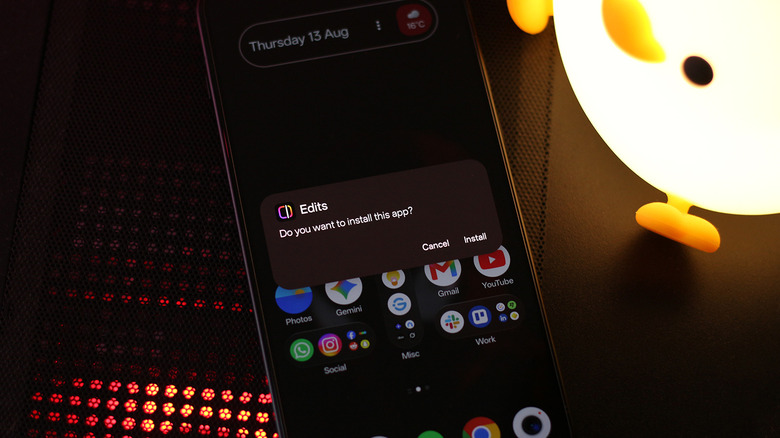

    Installing an app using an APK file.
    Adnan Ahmed for Engadget

    One of the beauties of Android as an operating system is how it lets you sideload applications relatively easily. Though Google is implementing a stricter security process for sideloading, you can still install apps outside the Play Store. On newer versions of Android, you will first have to enable developer mode by navigating to Settings > About Phone and tapping on Build Number seven times. You will be asked to restart your device as a preventative security measure. After a one-day wait, you can allow installation from unknown sources. This is a one-time security process that’s designed to protect you against social engineering attacks.

    You can now proceed to download an older, stable version of the app that’s been giving you trouble. I recommend using APKMirror to find the installation file, since it’s a source I trust. Remove the app from your phone and install its older version using its APK file by opening it from your file manager. Some apps that use split APKs may require you to use the APKMirror Installer app.

    Keep in mind that this is a temporary fix until the app developer publishes an update that addresses whatever bug was causing the crashes. When this happens, you will have to remove the app and install it back via the Play Store to make sure you receive future updates normally.

    Alternatively, if all of this is a hassle, you can simply resort to using the app’s web version in your browser for the time being. Most popular apps that also have a web version are optimized reasonably well for mobile browsers. You can even enable notifications for supported websites and pin them to your home screen for quicker access.

    Share. Facebook Twitter Pinterest LinkedIn Tumblr Email Telegram Copy Link
    News Desk
    • Website

    News Desk is the dedicated editorial force behind News On Click. Comprised of experienced journalists, writers, and editors, our team is united by a shared passion for delivering high-quality, credible news to a global audience.

    Related Posts

    US Science & Tech

    The Reasons Siri May Not Work On CarPlay

    August 23, 2026
    US Science & Tech

    Two years after launch, Walmart’s Flipkart is closing in on India’s quick-commerce leaders

    August 23, 2026
    US Science & Tech

    Harvard’s $699 startup bootcamp offers AI avatars of its instructors

    August 22, 2026
    US Science & Tech

    If Waymo Cars Are Level 4 Automation, What Does It Take To Be A Level 5?

    August 22, 2026
    US Science & Tech

    How To Limit Instagram From Using Your Data For AI And Ads

    August 22, 2026
    US Science & Tech

    Will the DOJ’s investigation into a16z spook other VCs?

    August 22, 2026
    Add A Comment
    Leave A Reply Cancel Reply

    Don't Miss

    Newcastle vs Liverpool: Line-ups confirmed at St James’ Park

    News DeskAugust 23, 20260

    Catch up with all the team news ahead of Newcastle vs Liverpool in the Premier…

    Cityblock to Acquire Homeward Health, Secures $116M Series E

    August 23, 2026

    Hugh Jackman’s Ex-Wife Cast Doubts On His New Romance

    August 23, 2026

    Scott Milanovich doesn’t regret personal absence after Hamilton Tiger-Cats’ loss to Toronto

    August 23, 2026
    Tech news by Newsonclick.com
    Top Posts

    SOUND FIST: ALEX WARREN – RESCUER

    August 9, 2026

    ‘The Bachelorette’ Star’s Wife Slammed Mocking Severe Disorder

    August 9, 2026

    Timothée Chalamet Absent From Kylie Jenner’s Birthday Bash

    August 9, 2026

    In Awe: A Guide to Everyday Wonder

    August 9, 2026
    Stay In Touch
    • Facebook
    • Twitter
    • Pinterest
    • Instagram
    • YouTube
    • Vimeo

    Subscribe to Updates

    Get the latest creative news from SmartMag about art & design.

    Editors Picks

    Newcastle vs Liverpool: Line-ups confirmed at St James’ Park

    August 23, 2026

    Cityblock to Acquire Homeward Health, Secures $116M Series E

    August 23, 2026

    Hugh Jackman’s Ex-Wife Cast Doubts On His New Romance

    August 23, 2026

    Scott Milanovich doesn’t regret personal absence after Hamilton Tiger-Cats’ loss to Toronto

    August 23, 2026
    About Us

    NewsOnClick.com is your reliable source for timely and accurate news. We are committed to delivering unbiased reporting across politics, sports, entertainment, technology, and more. Our mission is to keep you informed with credible, fact-checked content you can trust.

    We're social. Connect with us:

    Facebook X (Twitter) Instagram Pinterest YouTube
    Latest Posts

    Newcastle vs Liverpool: Line-ups confirmed at St James’ Park

    August 23, 2026

    Cityblock to Acquire Homeward Health, Secures $116M Series E

    August 23, 2026

    Hugh Jackman’s Ex-Wife Cast Doubts On His New Romance

    August 23, 2026

    Subscribe to Updates

    Get the latest creative news from FooBar about art, design and business.

    Facebook X (Twitter) Instagram Pinterest
    • About Us
    • Editorial Policy
    • Privacy Policy
    • Terms and Conditions
    • Disclaimer
    • Advertise
    • Contact Us
    © 2026 Newsonclick.com || Designed & Powered by ❤️ Trustmomentum.com.

    Type above and press Enter to search. Press Esc to cancel.